
A practical guide for your team
Help search engines read your business details.
Add structured data that matches the information customers can see on your page. Work through the examples, then test the markup before publishing it.
What to keep in mind
Choose one owner for each entity, render a safely serialized JSON-LD object once, inspect the built HTML, check for conflicting definitions, then validate the vocabulary and any supported Google search feature. Keep source, output and validation evidence together.
The implementation we actually tested
On 6 September 2026, we built a small standalone page with Astro 7.2.2 and Node 26.7.0. It contains the real Marsen name, public website address and a description also shown in the page body. The fixture is an implementation test; it is not a customer deployment or a replacement for the Marsen homepage.
The build emitted one JSON-LD script whose parsed object matched the input. A negative test inserted a second full definition of the same entity and confirmed that the duplicate check rejected it. Another test put an HTML script-closing sequence in the name: Astro still emitted only one script, and parsing the JSON recovered the original text.
- Download the tested Astro page and Organization input.
- Inspect the actual generated HTML.
- Read the timestamped test results and reproduction instructions.
We also checked the existing built Marsen homepage, schema generator and Search product page. Each contained one JSON-LD block and no repeated full entity definitions with the same identifier. This targeted code check does not rule out every possible schema conflict across the website.
Find the existing schema owner before pasting
Open the current page source and search for application/ld+json. In a CMS, inspect the SEO plugin and theme settings too. In Astro, inspect the shared layout and page component. A layout may already publish the Organization, WebSite and WebPage entities while a guide adds its Article.
Use one maintained definition for an entity on a page. A shared identifier such as https://www.marsentech.com/#organization lets an Article refer to its publisher without repeating the entire organization object. Multiple script blocks are not automatically wrong, and an @id-only reference is not a duplicate definition. The problem is conflicting or needlessly repeated descriptions of the same thing.
Our site already has a layout-owned organization. We tested the example in an isolated fixture rather than adding another Organization script to this guide. Edit the existing owner if one is present. Record who maintains the name, URL, logo and profile links so a rebrand does not leave incompatible versions in a plugin and a template.
Generate a draft from facts you can support
Open the schema markup generator, choose Organization and enter the business name and canonical homepage URL. Optional fields should contain real values or remain empty. The generator creates a draft; it does not verify your business, review the page or certify a Google feature.
{
  "@context": "https://schema.org",
  "@type": "Organization",
  "@id": "https://www.marsentech.com/#organization",
  "name": "Marsen Technologies",
  "url": "https://www.marsentech.com/",
  "description": "Marsen connects customer relationships, AI agents and search visibility."
}
The example adds a stable @id to the basic draft for use in other entity references. Replace the Marsen facts with your own when adapting it. Do not invent an address, rating, certification or price to make a validator display another green check.
Organization describes the business identity. An article needs Article properties, while a service page may describe a Service. Use the actual subject instead of attaching every type to every URL. Google’s Organization documentation explains the properties it uses.
Compare drafts for the five supported types
On 28 September 2026 we generated five fictional examples with the same draft builder used by the browser tool. Download Organization, LocalBusiness, Service, SoftwareApplication or Article, alongside the exact inputs.
All example.com URLs, business identities, addresses and article facts are teaching placeholders. Replace every value. The local results cover builder output and serialization, including invalid dates, non-HTTP URLs and HTML-sensitive text. They are not external vocabulary or Google eligibility tests. The validator screenshots below belong to the separate September 6 Organization fixture.
Use the schema troubleshooting table when a plugin already publishes the entity, facts conflict or a code test differs from a live URL test.
Connect a service page to the existing organization
For an Astro service page, use a page-specific Service identifier and point its provider to the organization identifier maintained by your layout. This keeps the service distinct from the business offering it.
The fictional Service and Organization graph shows both nodes together for inspection. In a site that already emits the Organization, add only the Service node and reuse the existing provider ID. Render it through the same safe serialization pattern shown above. The graph is an additional example, separate from the dated Organization build and external-validator evidence.
- Find the exact organization ID in the built page.
- Give the service a stable ID based on its own canonical URL.
- Set provider to an object containing the existing organization @id.
- Build the service page and check for conflicting full definitions.
- Check the visible service facts and validate the live markup.
Use the Service schema generator notes for provider and pricing choices. The Schema.org Service reference describes the provider relationship. A graph connects descriptions; it does not guarantee an AI citation or rich result.
Render JSON-LD in Astro without a client script
In a new minimal Astro project, put the downloaded input in src/pages/organization.json and the page in src/pages/index.astro. The essential implementation is below; the complete download includes visible content and document metadata.
---
import organization from './organization.json';
const jsonLd = JSON.stringify(organization, null, 2)
  .replace(/</g, '\\u003c')
  .replace(/>/g, '\\u003e')
  .replace(/&/g, '\\u0026');
---
<script type="application/ld+json" set:html={jsonLd} />
Astro renders this at build time. It does not need a hydrated React component or a browser event to insert the markup. The Astro directive documentation includes the JSON-LD pattern and explains that set:html does not automatically escape its value. Here serialization is followed by escaping HTML-sensitive characters, preventing a value containing a closing script tag from terminating the element.
Use the same reviewed data for visible content and structured data where practical. Do not concatenate untrusted strings into JSON or paste the object into executable JavaScript. The application/ld+json type identifies a data block. Our fixture is distributed as source and text output, so it does not create a competing public homepage.
Check generated output and duplicate definitions
Run the production build before judging the result. Inspect dist/index.html, not only the component source. To check every sitemap page at once, use the build script from our Astro SEO checklist. Copy the downloadable duplicate checker to the example project and run:
npm run build
node check-jsonld.mjs dist/index.html
For our fixture, the checker reports one JSON-LD block and an empty duplicateEntityDefinitions list. It parses every matching JSON-LD script and counts full definitions carrying both @id and @type. Repeated references containing only @id are allowed.
This check has limits. Two anonymous objects can describe the same business without sharing an identifier. A plugin can add schema after HTML loads. Microdata can duplicate a JSON-LD entity. Inspect the rendered page and plugin output too; this is a regression check, not a complete semantic validator.
After a template change, repeat the test on a representative homepage, article and product page. Keep the command in the release checklist so a later plugin or layout update cannot quietly reintroduce the same organization.
Read the two validator results correctly
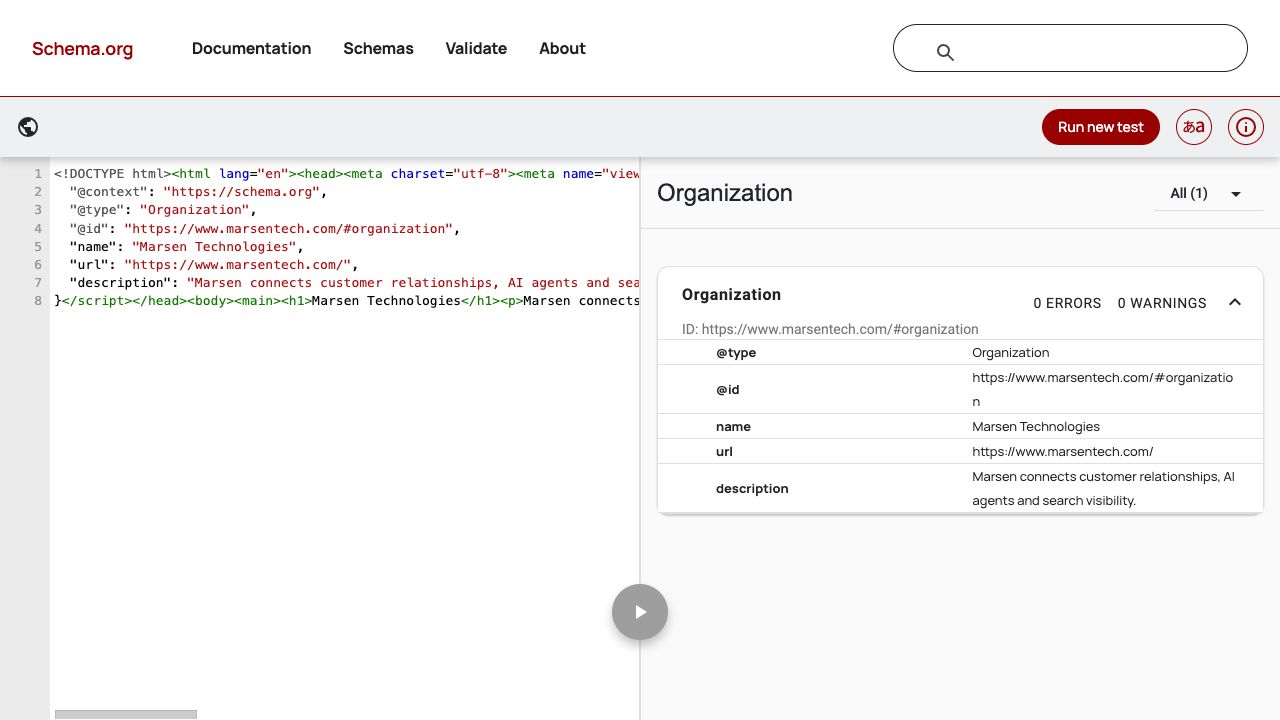
We pasted the exact generated HTML into the Schema Markup Validator. It detected one Organization with zero errors and zero warnings. This screenshot is the actual code-test result from 6 September 2026.
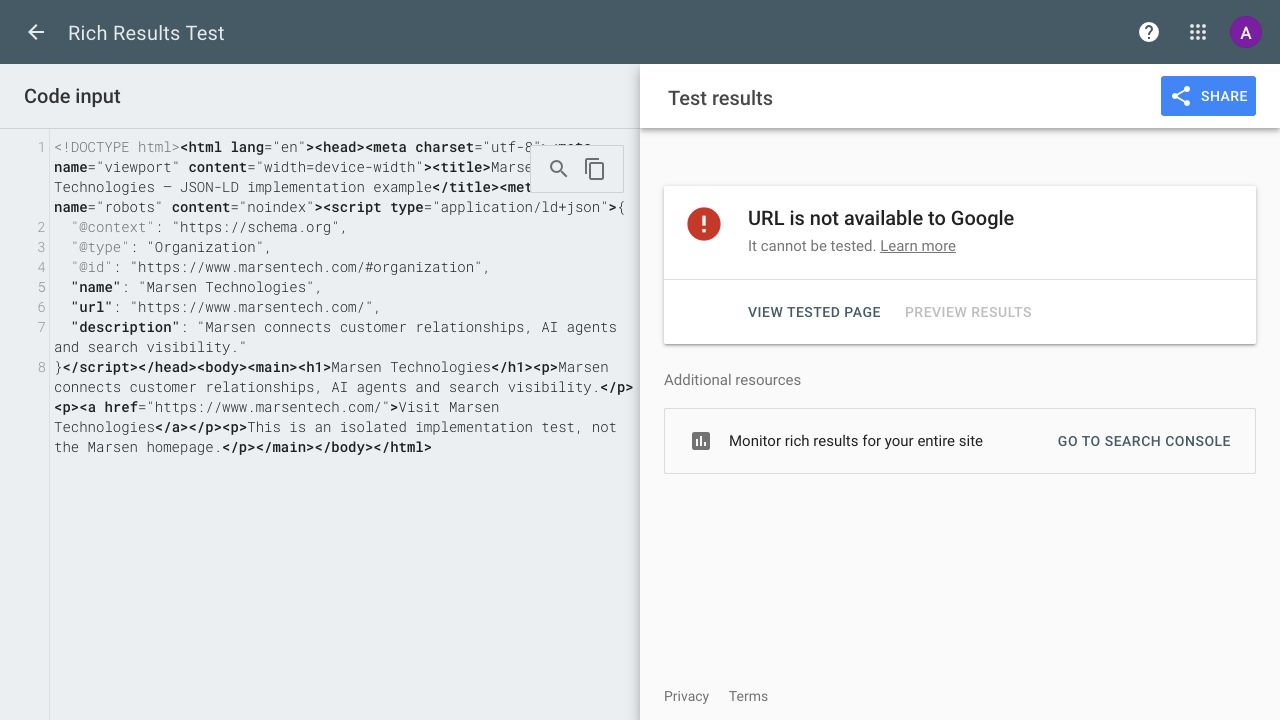
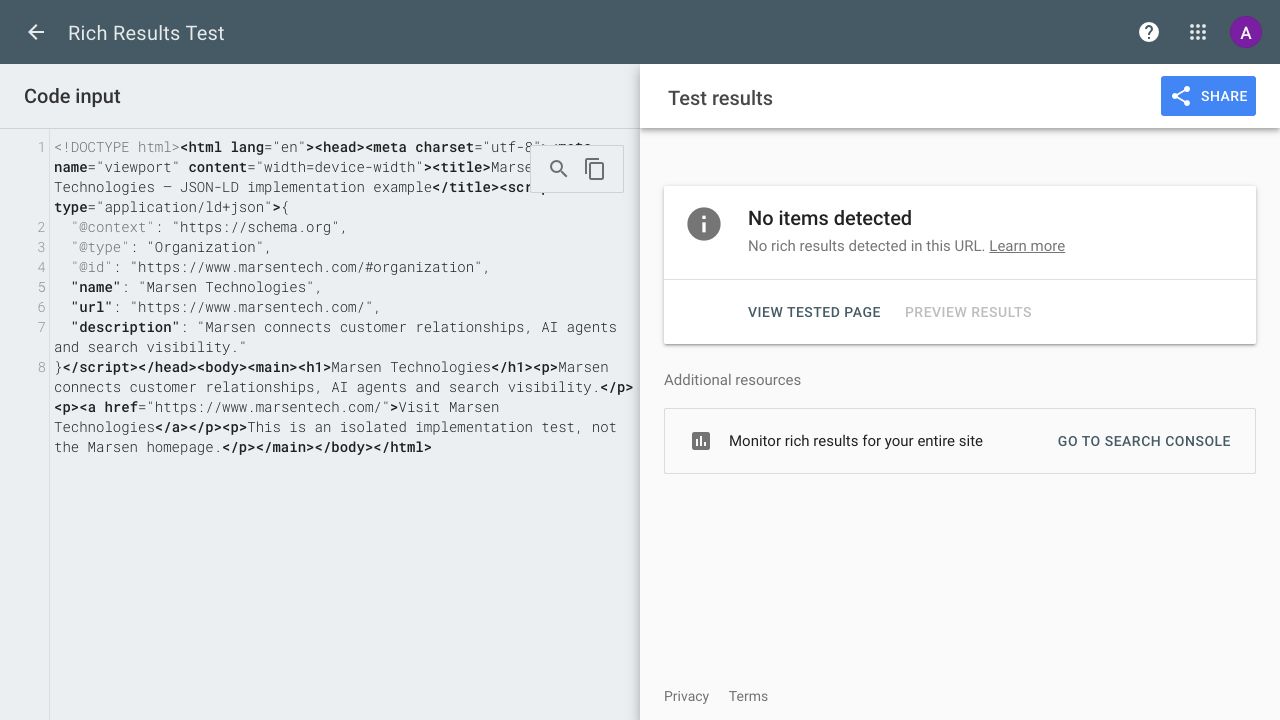
We tested the same HTML in Google’s Rich Results Test. The initial fixture included noindex, and Google’s code test refused to evaluate it. We saved that failed-test screenshot, removed the directive from the isolated fixture, rebuilt and tested again. The rebuilt example returned “No items detected” in Google’s test, while Schema.org still recognized the Organization. This minimal identity example therefore demonstrates valid vocabulary, not an eligible rich-result feature. Read the recorded validator outcomes.
A passing test does not promise a search appearance. Google’s structured-data guidelines require accurate, relevant, accessible content and leave display decisions to Google. A code test also does not test live fetching or establish that a URL is indexed.
Publish, inspect the live page and maintain the evidence
- Review the facts and choose the existing schema owner.
- Build and inspect the emitted HTML, including visible content.
- Run the duplicate check and both appropriate validators.
- Deploy the intended public page, then validate its live URL.
- Inspect that URL in Search Console to check access and indexing independently.
- Save the source version, output, date and screenshots together.
Refresh the evidence when the implementation changes, a relevant validator changes its requirements, or the entity’s public facts change. A new screenshot should represent a new test; changing a date alone does not refresh the implementation.
Measure whether the page gets indexed and reaches the right audience through the AI visibility measurement workflow. Marsen Search connects visibility work to the broader business context. Schema and llms.txt do not provide an automatic ranking or AI-citation benefit.
Where should JSON-LD go in an Astro page?
Render a script with type application/ld+json in the head or body. Choose the existing layout or page owner so the same entity is not defined twice. Build-time rendering makes the markup available in delivered HTML.
Does JSON.stringify alone make set:html safe?
JSON.stringify creates valid JSON but can leave HTML-sensitive characters in string values. The tested implementation also escapes less-than, greater-than and ampersand characters before inserting the serialized object into the JSON-LD script.
Is more than one JSON-LD script a duplicate-schema error?
No. A page can describe different entities in separate scripts. Review conflicting or repeated full definitions of the same entity; an @id-only reference is valid and is not a repeated full definition.
What exactly did the downloadable test check?
It checked one isolated Astro build for one emitted JSON-LD script, matching input/output, duplicate rejection and script-closing input handling. It also checked three existing built Marsen pages for repeated typed entity identifiers. It does not prove Google eligibility or indexing.
Will passing the validator improve rankings?
A passing validator confirms only the checks it performs. Google still evaluates content, technical access, type-specific rules and display eligibility. There is no guaranteed ranking, rich-result or AI-citation benefit.

Built around your business
Put these ideas to work in your business.
Book a demoShow us how your team works today. We’ll help you choose a useful first step.