
A practical guide for your team
n8n human approval: test 13 cases before connecting a CRM.
An n8n human approval workflow needs more than an approve button. Bind the decision to the reviewed action, reject expired or changed requests, and confirm the destination result. This downloadable lab exercises those rules inside n8n before you connect a real CRM.
What to keep in mind
The 28 September 2026 run passed 13 cases on n8n 2.35.4. It uses a Manual Trigger and Code nodes with synthetic events and an in-memory destination. It is an acceptance lab: it does not implement a live approval webhook, authenticate reviewers or prove production reliability.
Import and run the acceptance lab
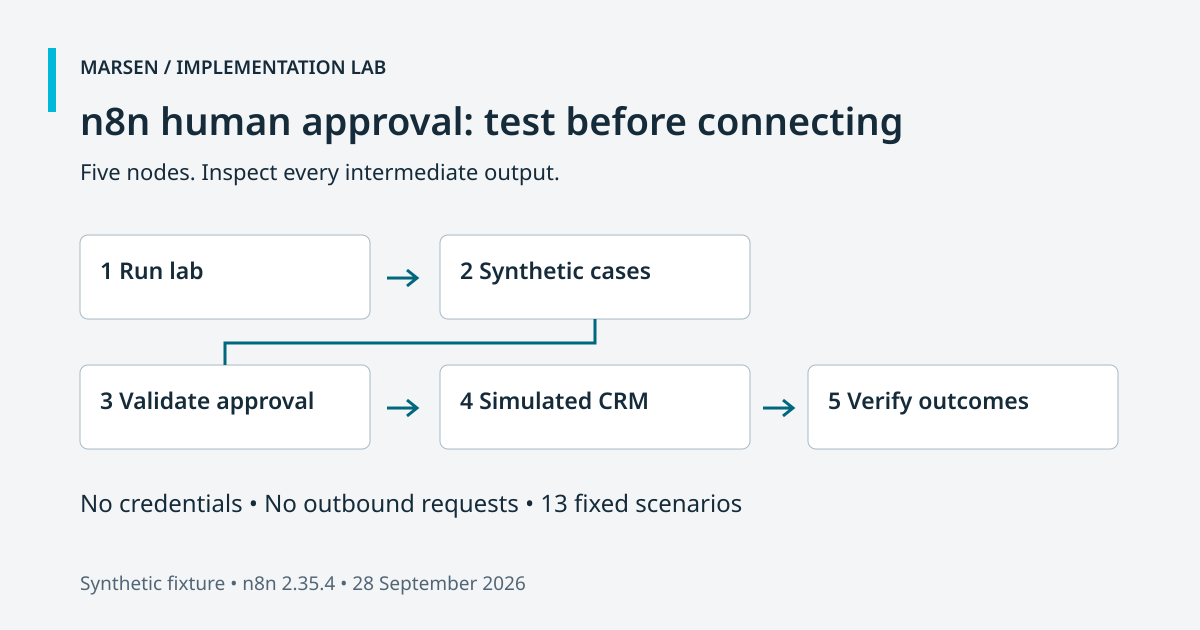
Download the versioned workflow JSON and import it into a new workflow in a disposable n8n workspace. Keep the workflow inactive. Select Execute Workflow, then open the final Verify outcomes node. A successful run produces 13 items with passed: true. No credentials, external requests or customer records are required.
The five connected nodes have separate jobs. Run lab starts one execution. Synthetic cases supplies fixed inputs and expected outcomes. Validate approval evaluates the proposal and decision. Simulated CRM models a destination receipt. Verify outcomes compares actual results with the expectations and throws an error if a check fails. This lets you inspect intermediate node output when a changed rule breaks a scenario.
Use the reproduction instructions for a Docker command pinned to the tested version. It creates an ephemeral database and disables container networking. The published result came from executing the imported workflow in n8n 2.35.4, rather than running its JavaScript only in Node.js. A local convenience runner is also provided, but it is not the source of the n8n runtime evidence.
Download the scenario inputs, approval node source, destination node source and assertion node source to review the mechanics. The import file contains the executable copies. Changing a separate source file does not automatically update an imported workflow.
Bind approval to the exact action
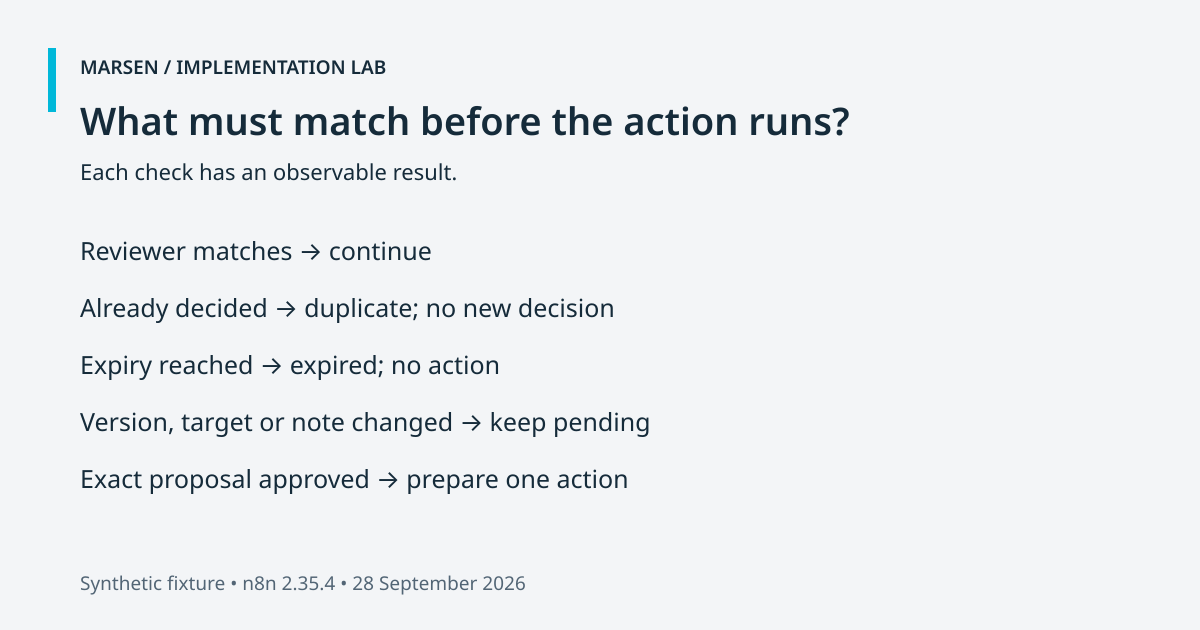
Each proposal records an identifier, version, target record, note, reviewer and expiry. A decision is useful only for that reviewed combination. If the proposed note or target changes, obtain a new approval rather than carrying the old decision across. Our fixture compares these fields directly because its payload is small and explicit.
The gate checks the simulated reviewer first, then terminal state, expiry, payload identity and decision type. Rejecting a request makes it terminal. A later approval event for that same proposal does not create a write. A mismatched payload remains pending so the original proposal can still be reviewed; it does not silently replace the stored proposal. An unsupported decision such as “maybe” also cannot authorize the action.
The mock reviewer is a string supplied by the test. In a deployed workflow, that identity must come from an authenticated and authorized context. Never trust a reviewer name sent in a public request body. Store the decision against the durable proposal version and record who made it. Use the general human approval guide to define the policy before implementing the transport.
Treat timeout as expiry, not approval
The expiry test uses a deterministic clock: an event at 2000 is rejected when the proposal expires at 2000. These values are fixture inputs, not measured wait durations. Equality is deliberately on the expired side of the boundary. In an implementation, compare a server-controlled time with the stored expiry; do not let an incoming callback choose its own time.
The official n8n Wait documentation describes webhook resumption, authentication choices and a limit on wait time. Those are transport and scheduling features. A resumed execution still needs to decide whether a valid approval exists. Route the timeout branch to an expired outcome instead of allowing it to fall through to the CRM writer.
This lab injects decision events directly into Code nodes. It does not test a Wait node, public webhook delivery, authentication credentials or elapsed-time scheduling. For a live approval webhook, test the actual callback route, enforce its authentication, authorize the reviewer for the proposal and protect the resume URL. Record the execution reference alongside the proposal so operators can investigate an expired or interrupted review.
Separate approval replay from delivery replay
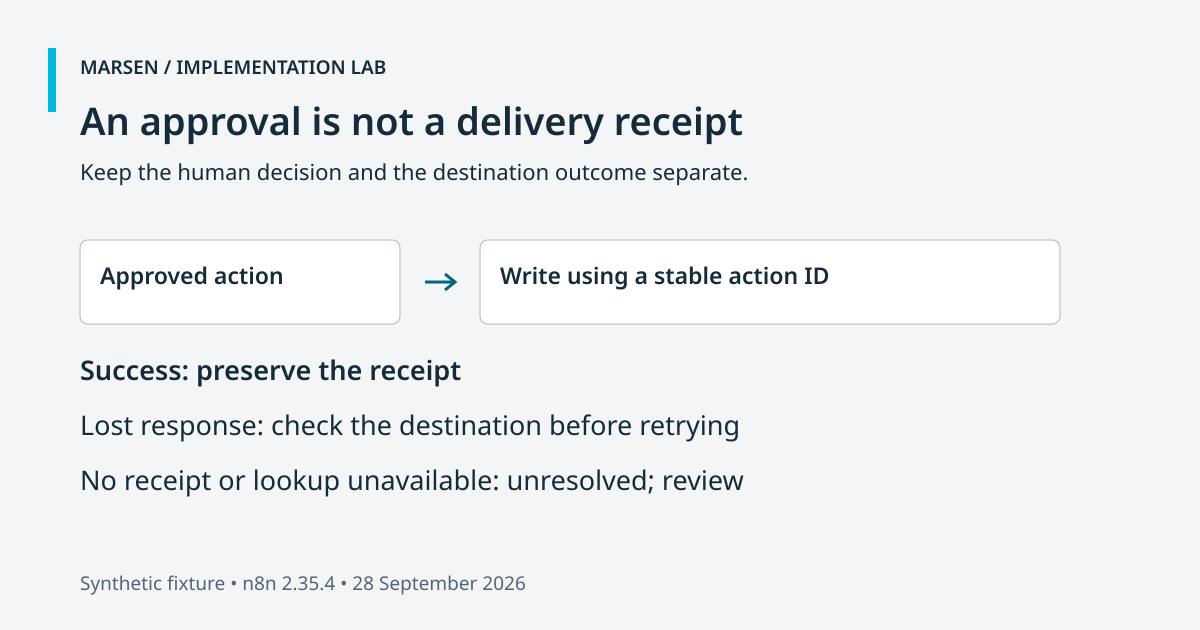
A repeated approval and a repeated CRM delivery are different events. The approval test receives the same decision twice and prepares one approved action. The delivery test sends that action to the simulated destination twice. Its receipt map recognizes the stable action identifier and returns the existing receipt rather than creating another entry.
A real destination needs equivalent idempotency or reconciliation support. An idempotency key is a stable reference the destination uses to recognize a repeated action. The fixture combines proposal ID and version for that purpose. Do not generate a fresh key for each retry: the destination would no longer have a reliable way to recognize the same work.
The ambiguous-timeout scenario models a write that committed before its response was lost. It looks for the existing receipt and records reconciliation. The downstream-failure scenario fails before writing and keeps the error visible. Approval remains approved in both cases; approval status and delivery status answer different questions. Neither result should be summarized as “done” without checking the destination.
Inspect the 13 observed outcomes
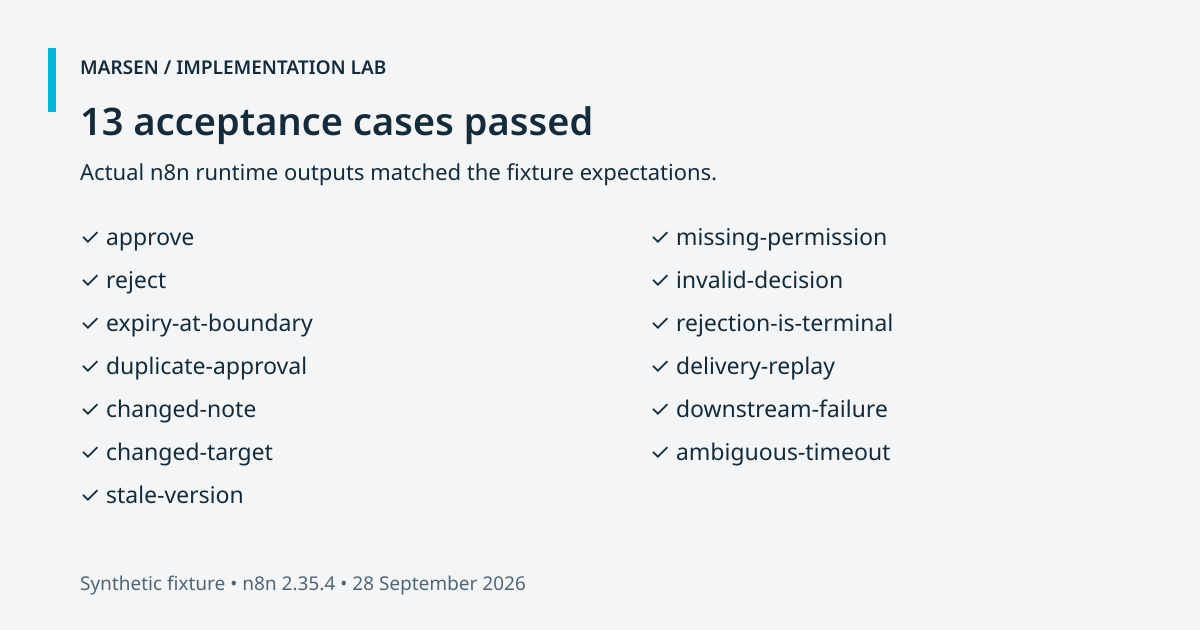
The dated runtime results preserve expected and actual outputs. All 13 scenarios passed in the recorded n8n 2.35.4 run on 28 September 2026. “Passed” means the output matched the stated acceptance check. It does not establish coverage of every possible payload, network fault or operator action.
| Scenario | Expected result |
|---|---|
| Approve | Approved; one simulated write |
| Reject | Rejected; zero writes |
| Expiry at boundary | Expired; zero writes |
| Duplicate approval | Duplicate recorded; one write |
| Changed note | Changed payload; zero writes |
| Changed target | Changed payload; zero writes |
| Stale version | Changed payload; zero writes |
| Missing permission | Unauthorized; zero writes |
| Invalid decision | Invalid decision; zero writes |
| Approval after rejection | Still rejected; zero writes |
| Delivery replay | Existing receipt; one write |
| Downstream failure | Visible destination error; zero writes |
| Ambiguous timeout | Receipt reconciled; one write |
Define what remains before production
All state in this lab belongs to one execution. A new execution starts with new proposals and receipts. That makes the lab reproducible, but it cannot prevent two workers in separate executions from racing to write the same action. Do not replace the simulated CRM with a production writer and assume the replay tests now establish cross-execution protection.
Before rollout, implement durable proposal storage, atomic decision ownership and a destination that supports safe replay or reliable receipt lookup. Test simultaneous approvals, a restart between approval and delivery, timeouts after a real write and a reviewer whose access has been revoked. Define a recovery owner for unresolved outcomes. Preserve enough evidence to reconcile the action without storing unnecessary customer information.
Run the same acceptance cases against a sandbox destination using its real field schema and response codes. Measure delivery separately from the human decision. Confirm what operators see when a write fails and what the customer is told. The Marsen enquiry-receipt pilot provides a separate, scoped example of checking a destination receipt; it is not evidence that this approval lab has been deployed to that CRM.
For a website enquiry, connect these boundaries to the website-chat handoff example. If you need help adapting them, review the n8n implementation service with one proposed action, one destination and explicit acceptance checks. That gives the implementation a reviewable scope before additional tools or agent actions are added.
Is this a production n8n approval workflow?
No. It is an importable acceptance lab tested on n8n 2.35.4. It uses synthetic events and an in-memory destination. Production authentication, durable state, real webhooks and destination integration need separate implementation and testing.
Does an n8n approval timeout authorize the action?
No. Treat timeout as an expired or unresolved review. Resuming a workflow is not evidence of approval; validate the decision before the write.
Does this prove duplicate callbacks are safe?
It tests duplicate decision events and destination replay inside one execution. Separate webhook deliveries, concurrent workers and restarts are outside the measured scope.
Can I use the lab without a CRM account?
Yes. Import the JSON into a disposable n8n workspace and execute it manually. The destination is simulated and the workflow has no credentials or outbound requests.

Built around your business
Put these ideas to work in your business.
Book a demoShow us how your team works today. We’ll help you choose a useful first step.