
WhatsApp chatbot
WhatsApp Chatbot for Business in India
What is a WhatsApp chatbot?
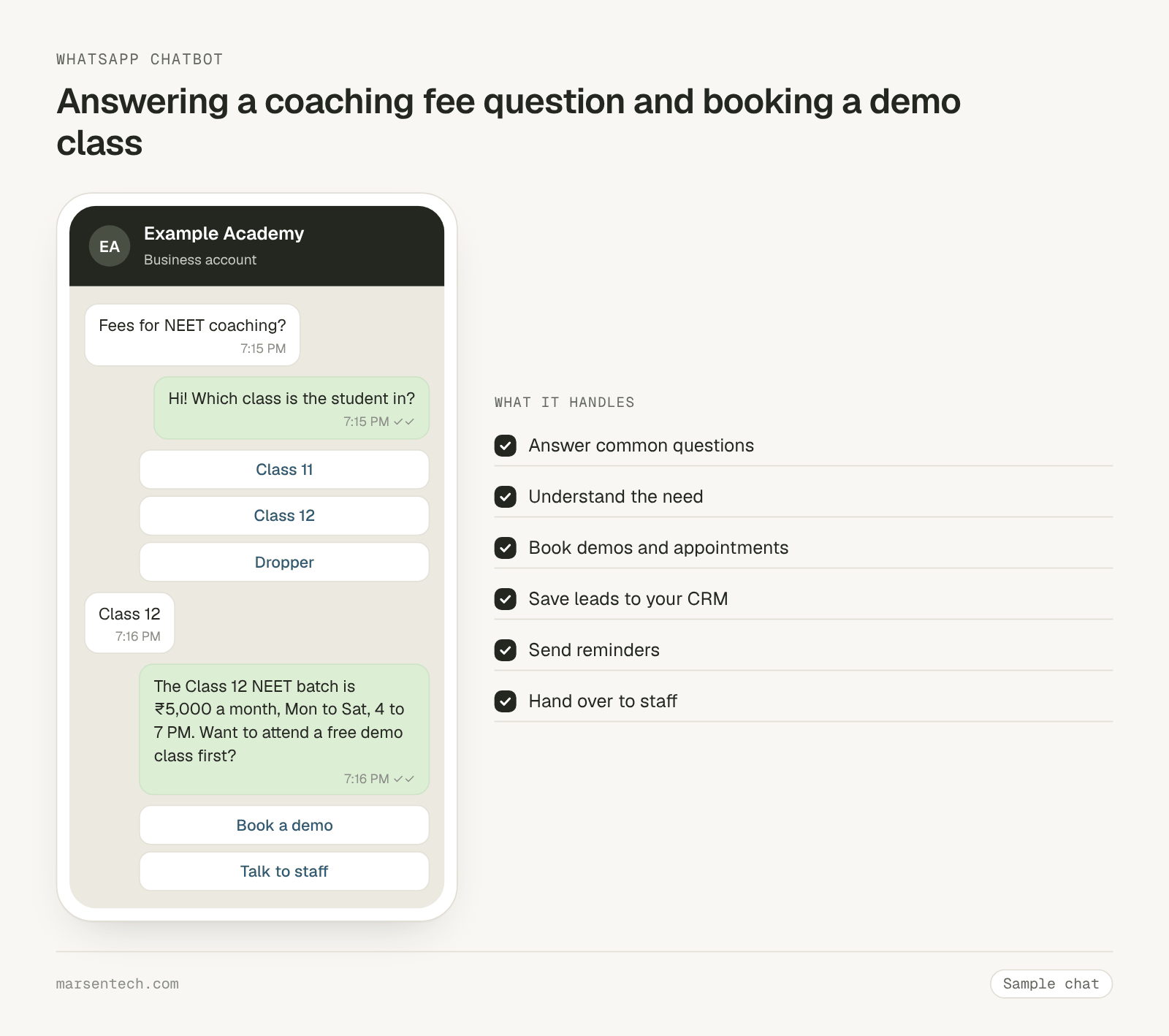
A WhatsApp chatbot replies to your customers on WhatsApp for you, at any time of day. It answers common questions and asks a few of its own to understand each enquiry. Then it books the next step or passes the conversation to your team.
We're Marsen Technologies, an AI automation agency in Siliguri. We build WhatsApp chatbots for service businesses across India, from coaching institutes to clinics. Book a free 60-second enquiry audit and we'll show you which questions a chatbot could answer for you.
What can a WhatsApp chatbot for business do?
A good chatbot takes care of the repetitive messages your team currently answers manually every day. Here's what we usually set up first:
- Answer common questions: Share fees, timings, locations and course or service information instantly, even outside office hours.
- Understand the need: Ask what the person is looking for, which class or service, and when they'd like to start.
- Book demos and appointments: Offer available slots and confirm each booking automatically inside the conversation.
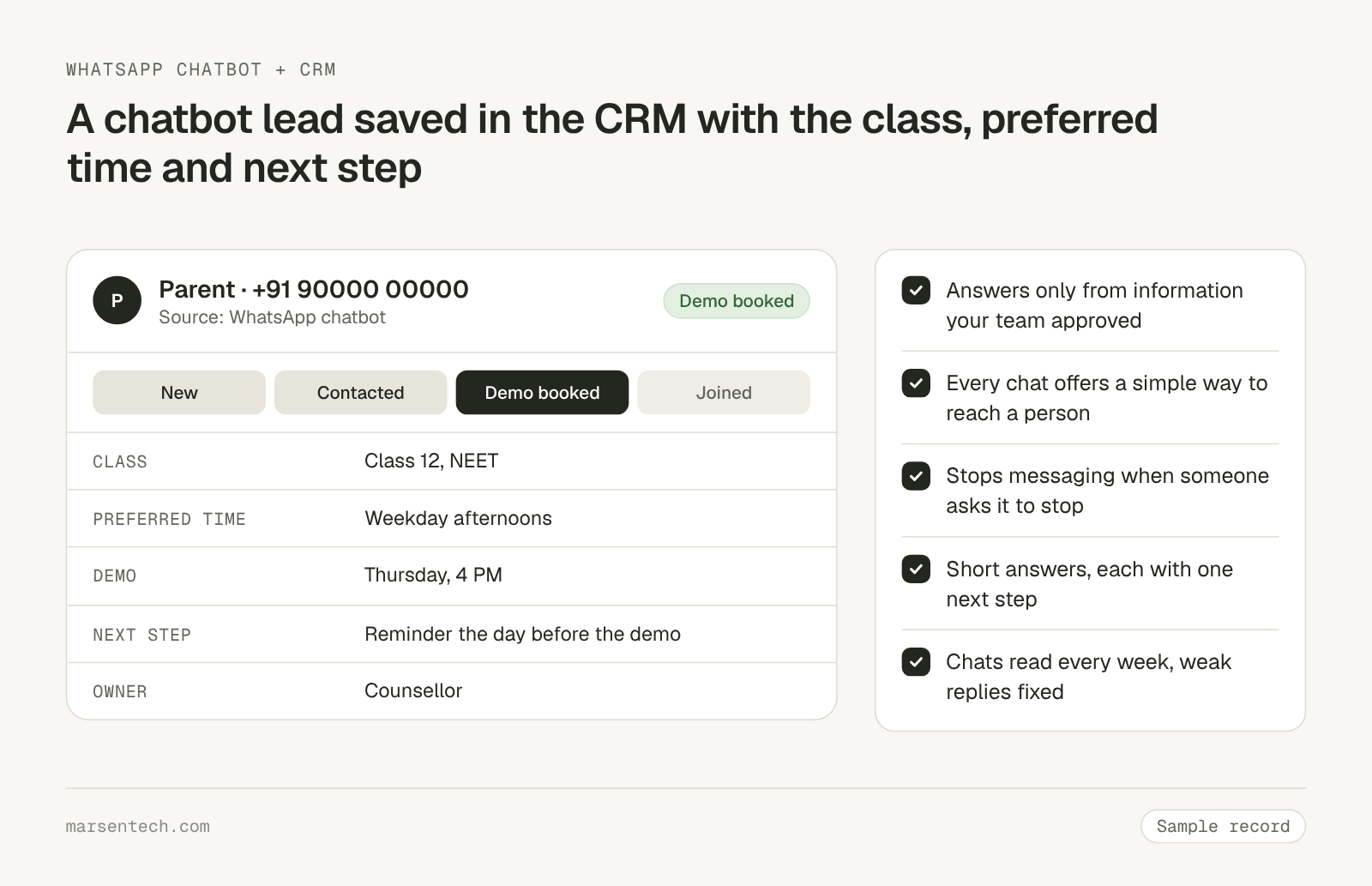
- Save leads to your CRM: Send every name, requirement and next step to your records automatically, without copying anything.
- Send reminders: Remind people about booked visits, fees that are due or questions they left half-way.
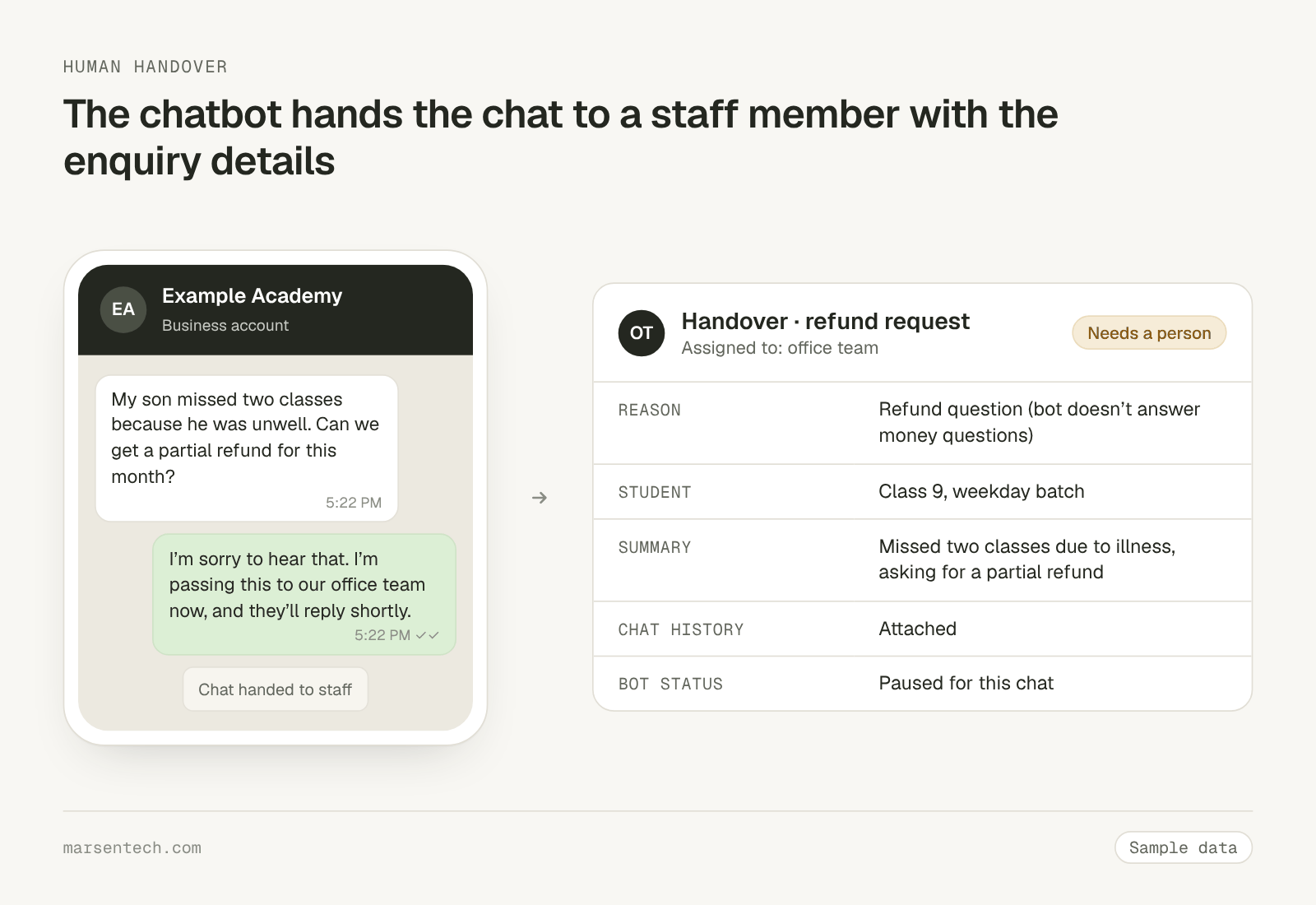
- Hand over to staff: Pass the conversation to a person for complaints, unusual requests or anything it can't answer.
How does a WhatsApp business chatbot work?
- A customer sends a message, taps your WhatsApp link or scans your QR code.
- The chatbot replies with a short greeting and a direct answer or a few buttons.
- It asks one or two questions to understand what the person needs.
- It suggests the next step, such as a demo slot, a call back or a fee list.
- It saves the details in your CRM and alerts your team when a person should take over.
Your WhatsApp business chatbot runs on the official WhatsApp Business Platform, which Meta offers for business messaging. That's what lets it connect to your CRM and booking calendar.
Do you need a rule-based chatbot or an AI chatbot?
| Feature | Rule-based chatbot | AI chatbot |
|---|---|---|
| How it replies | Buttons and fixed menus | Reads questions people type in their own words |
| Best for | A small set of repeat questions | Many different questions |
| Setup | Faster and simpler | Needs your approved answers to work from |
| Watch out for | Can feel stiff | Must stay within the answers you've approved |
Many businesses start with buttons for the main questions and add AI for typed questions later. We'll help you choose based on the questions your customers actually ask.
Which businesses in India use WhatsApp chatbots?
A chatbot for businesses works best when the same questions come in every day. These are the four we build for most often.
Coaching institutes
Parents usually ask about fees, batch timings and available demo classes. The chatbot answers them, books a demo and reminds families before fees are due.
Clinics
Patients usually ask about appointments, doctor availability and clinic timings. The chatbot books the visit and shares directions, while every health question goes straight to your staff.
Consultants and agencies
Prospects want to know whether you can actually help with their particular problem. The chatbot asks a few questions about their goal and offers a call slot.
Local service businesses
Customers usually ask for quotations, site visits and approximate prices. The chatbot records the job, the area and the best time to call back.
How much does a WhatsApp chatbot cost in India?
Our plans have a one-time setup fee and a monthly fee, both in Indian rupees. After the free audit, we'll tell you which plan fits the chatbot you need.
| Plan | Setup fee | Monthly fee | Best for |
|---|---|---|---|
| Missed-call WhatsApp Starter | ₹12,999 | ₹4,999 | Missed calls and instant WhatsApp replies |
| Enquiry-to-Admission Sprint | ₹45,999 | ₹12,000 | Full follow-up on WhatsApp and CRM |
| Full AI Follow-Up System | ₹85,999 | ₹25,000 | AI agents, voice and more channels |
Meta charges separately for some WhatsApp messages. Your replies within 24 hours of a customer's last message don't cost anything. Meta does charge for most template messages, like marketing messages or reminders you send later. We'll go through these costs and GST with you before you start.
What makes good WhatsApp customer support on a chatbot?
Good WhatsApp customer support feels quick and personal, even when a chatbot sends the first reply. We build every chatbot around these rules:
- It only answers using information your team has already approved.
- Every conversation offers a clear, simple way to reach a real person.
- It stops messaging immediately whenever someone asks it to stop.
- Each answer stays short and finishes with exactly one next step.
- We read the chats every week and fix any weak replies.
The chatbot handles routine questions, so your team has more time for the chats that need a human.
How do we build your chatbot?
- Audit: We look at where your enquiries come from and where they get stuck.
- Map the questions: We list your most common questions and agree on each answer with you.
- Build: We set up the chatbot, connect your CRM and add the handover to staff.
- Test: We try real examples, like a half-finished booking or a request to stop messages.
- Launch and review: We go live, then read the chats and improve the replies.
What do you need to get started?
You don't need any technical setup on your side. We'll ask you for four things:
- A phone number for WhatsApp, either your current one or a new one.
- A Meta business account, which we'll help you create if you don't have one.
- Your most common questions and the answers you're happy to share.
- Your booking rules and the name of the person who takes over chats.
What mistakes should you avoid with a WhatsApp chatbot?
Most chatbot problems come from trying to do too much on day one. Watch out for these common mistakes:
- Long menus: People leave when they see ten options, so three or four clear choices work better.
- No way out: If the chatbot can't help, the person should reach a human in one tap.
- Guessing answers: An AI chatbot should never make up fees, dates or offers you haven't confirmed.
- Too many reminders: Two or three timely reminders feel helpful, while daily messages feel like spam.
- Set and forget: Questions change with new batches and seasons, so your answers need regular updates.
What results can you expect?
One service business we worked with went from 1 closed deal a month to 7 after adding AI follow-up. That's one result, not a promise. Your numbers depend on your enquiries, your offer and how quickly your team picks up the chats the chatbot passes on.
The easiest place to start is your most common question. Book your free enquiry audit and we'll help you find it.
Frequently asked questions
Is a WhatsApp chatbot allowed for business?
Yes, when it runs on the official WhatsApp Business Platform and follows Meta's rules. That means people opt in before you message them first, you use approved templates and you offer an easy way to opt out.
Can the chatbot reply in Hindi or other languages?
Yes, we can set up replies in English, Hindi, Bengali or any other language your customers prefer.
Do I need the WhatsApp Business API for a chatbot?
Yes, you'll need the API for a proper chatbot. The free WhatsApp Business app only offers greeting messages, away messages and quick replies.
Will the chatbot replace my staff?
No, it simply takes the repetitive questions off their plate, so they can focus on calls, visits and conversations that need a person.
Does the chatbot work with my CRM?
We connect it to most CRMs that offer an API. If you don't have a CRM yet, we can set up a simple one for you.
Is a WhatsApp chatbot the same as WhatsApp automation?
Not exactly, because the chatbot is only the part that talks to customers. WhatsApp automation also covers the steps around each conversation, such as missed-call replies, follow-ups and CRM updates. Most of our setups include both.
How long does setup take?
That depends on how many questions and steps your chatbot needs. We'll give you a clear timeline after the free audit.
About the author
Aranyak Sengupta is a co-founder of Marsen Technologies, an AI automation company in Siliguri, India. He builds WhatsApp enquiry replies, follow-up automation and CRM workflows for coaching institutes, clinics and other service businesses.
Related pages

A practical next step
Tell us what
you want to improve.
Book a call You don’t need a technical plan to start a conversation.