
Free tool / WhatsApp
Free WhatsApp Link Generator: wa.me Link and QR Code
How do I create a WhatsApp chat link in seconds?
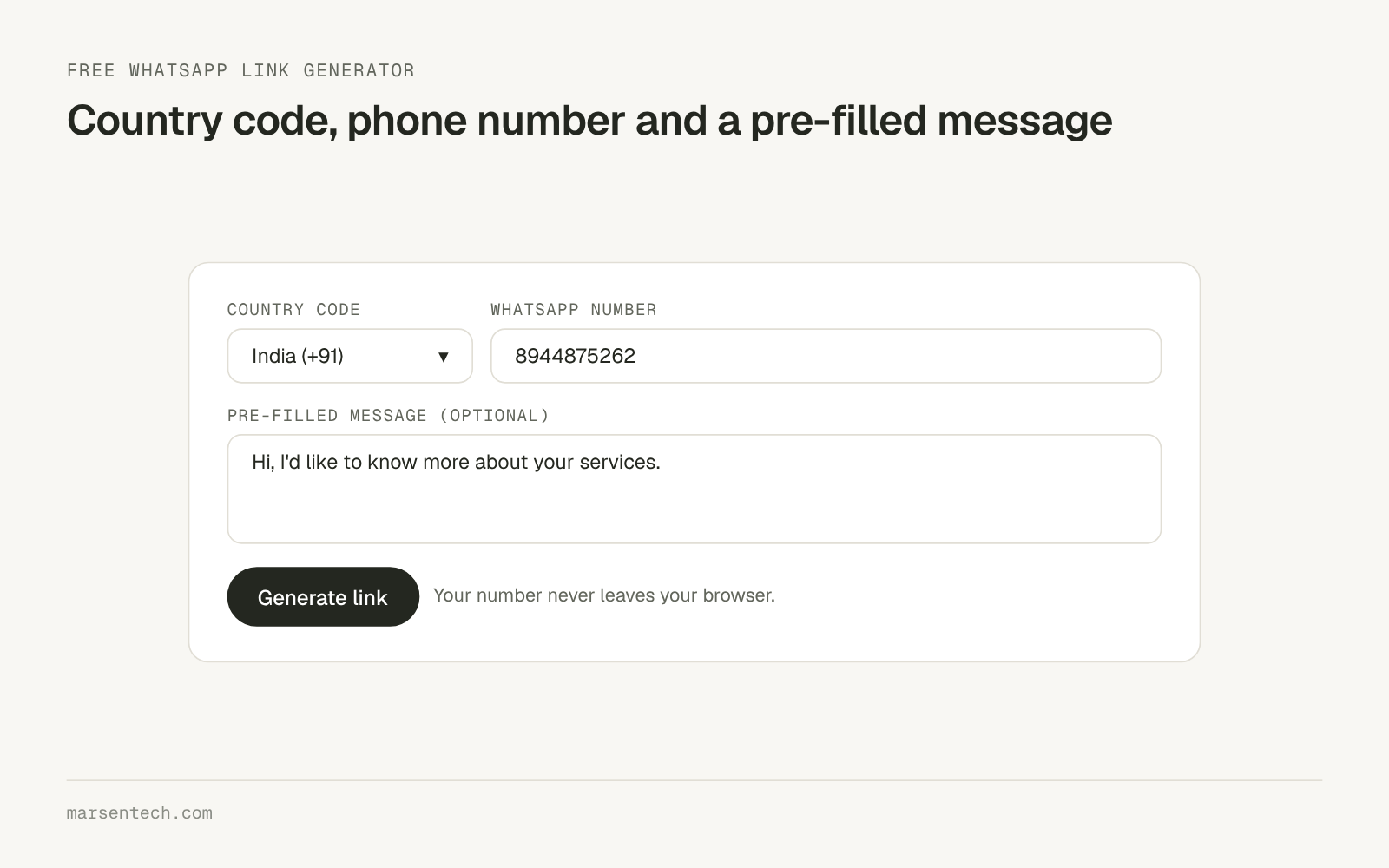
Create a WhatsApp chat link in seconds with this free WhatsApp chat link generator. Enter your phone number and an optional pre-filled message, then copy your wa.me link or download a printable QR code.
The generator is completely free, requires no registration, and works with WhatsApp and WhatsApp Business in every country. Your phone number never leaves your browser.
What is a WhatsApp link?
A WhatsApp link automatically opens a conversation with your number when someone taps it. People also call it a click-to-chat or wa.me link.
Visitors don't need to save your number as a contact first. If you include a pre-filled message, it appears automatically in their chat box, so they only have to press send.
A WhatsApp link looks like this: https://wa.me/919876543210?text=Hi
| Part | Example | What it does |
|---|---|---|
| Domain | https://wa.me/ | WhatsApp's official short link address |
| Phone number | 919876543210 | Your number with its country code, like 91 for India. No plus sign, spaces or leading zero. |
| Message | ?text=Hi | Optional pre-filled message that appears in the visitor's chat box |
What does a WhatsApp link generator do?
A WhatsApp link generator builds that link for you automatically. Small formatting mistakes, such as a leading 0 or a plus sign, prevent the conversation from opening.
Our generator strips out extra characters, adds your country code and encodes the message, so the link works immediately.
How to generate WhatsApp link: step by step
Here's how to generate WhatsApp link for your business number using this tool:
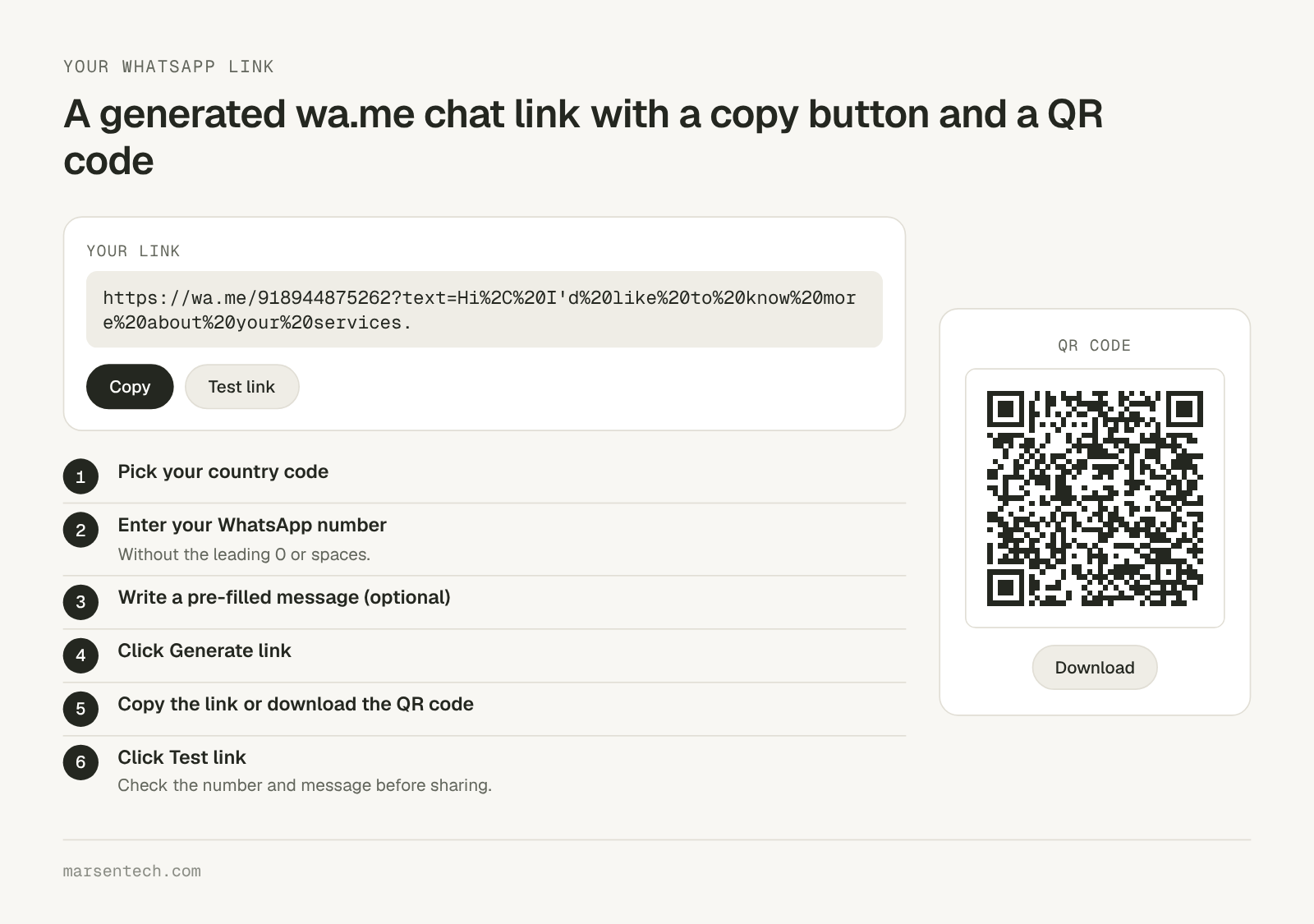
- Pick your country code. We automatically select your current country, but you can change it.
- Enter your WhatsApp number without the leading 0 or any spaces.
- Write a pre-filled message (optional). For example, "Hi, I'd like information about the weekend batch."
- Click Generate link. Your custom wa.me link appears immediately below the form.
- Copy the link or download the QR code for printing, presentations or social media.
- Click Test link to verify the number and message before you share it publicly.
How do I make a WhatsApp chat link by hand?
Type https://wa.me/ followed by your number with the country code. To add a message, put ?text= after the number, then your message with %20 in place of each space.
A generator is faster and avoids encoding mistakes, especially with commas, question marks or emojis in your message.
Does the WhatsApp Business app have a short link?
The WhatsApp Business app also gives you a short link for your business number. Open Settings > Business tools > Short link to share it or its QR code.
Use our generator whenever you need a different pre-filled message for each advertisement, page or campaign.
How do I create a WhatsApp QR code?
- Generate your link above with the number and message you'd like to use.
- Click Download QR code to save the image to your computer or mobile device.
- Scan it with your own phone to confirm it opens the correct conversation.
- Print it at least 2 cm wide so mobile cameras can recognise it reliably.
When someone scans it, WhatsApp immediately opens a conversation with your message already typed.
Where should I use my WhatsApp link?
A WhatsApp link often generates more enquiries than a form, because people already use WhatsApp throughout the day. Give each location its own pre-filled message so you know where conversations originate.
Instagram bio and stories
Add the link to your Instagram bio, and use the link sticker in stories to direct viewers to a conversation.
Your website
Add a "Chat on WhatsApp" button to your contact, pricing and landing pages to capture enquiries directly.
Google Business Profile
Include the link in Google posts and the booking field, so Maps visitors can contact you immediately.
Ads and email
Send advertising clicks directly to a conversation instead of a form. Add a "Message me on WhatsApp" line to your email signature.
Flyers and front desk
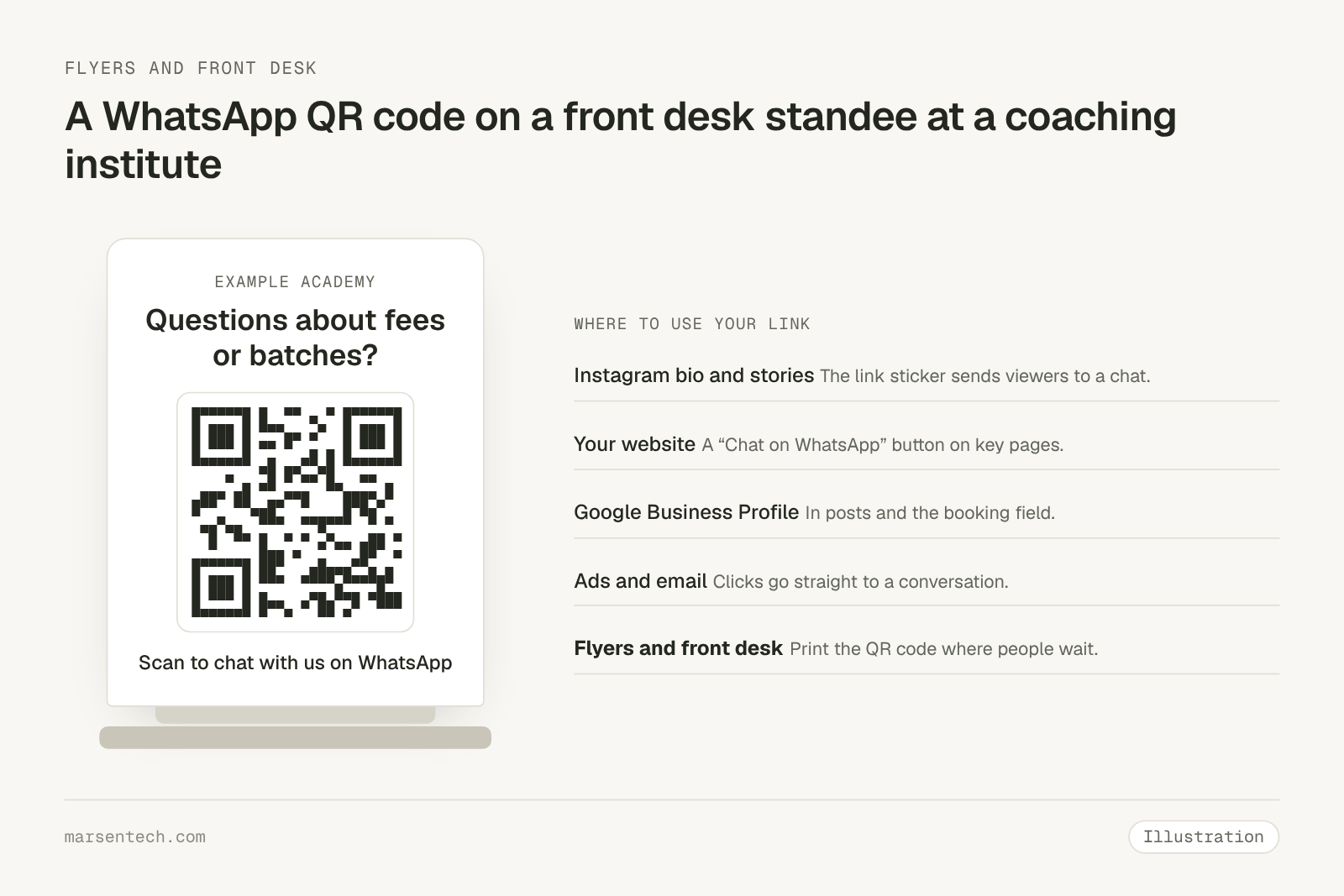
Print the QR code on flyers, visiting cards, packaging and your reception counter. Visitors can then start a conversation on the spot.
How to generate group link on WhatsApp?
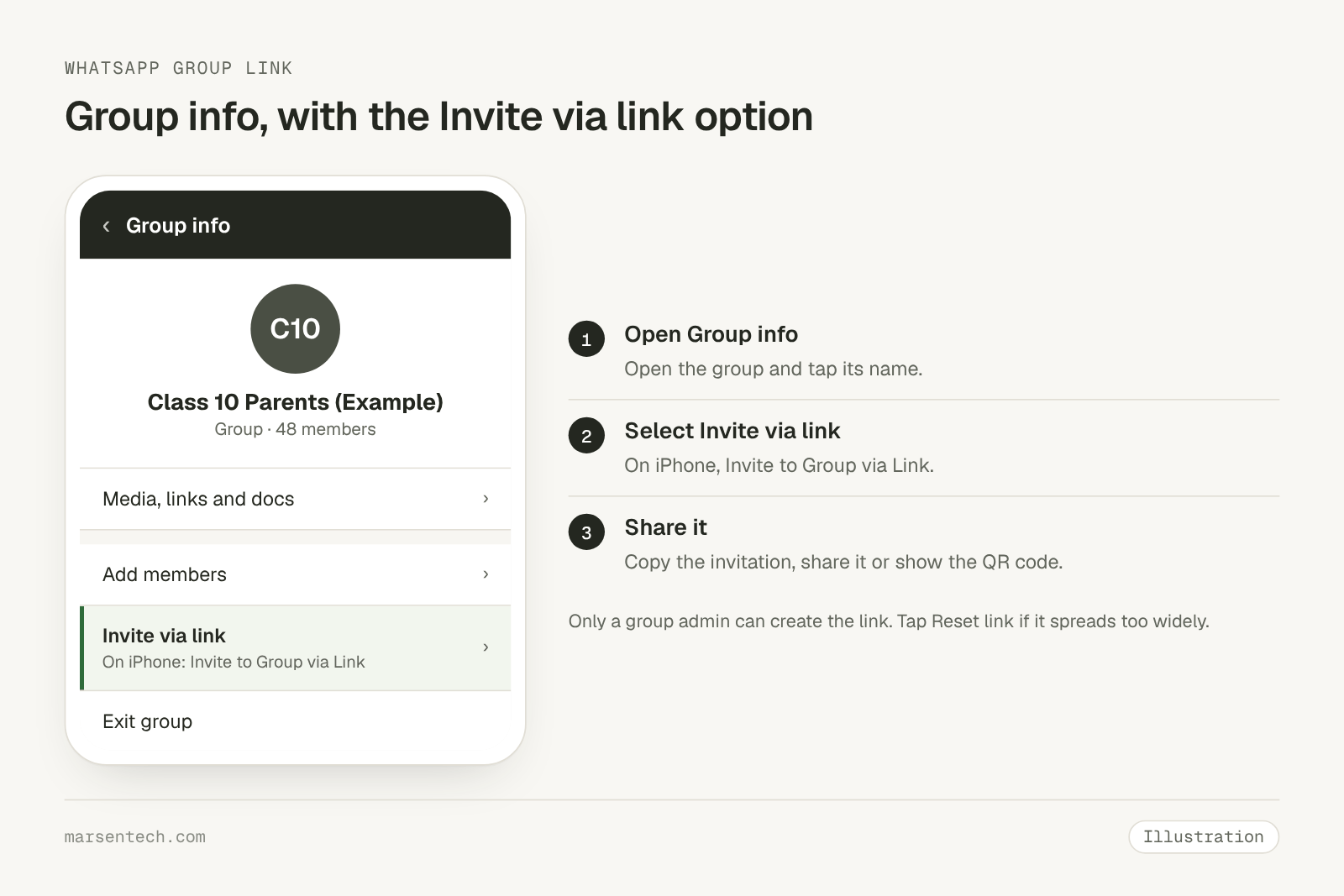
If you're wondering how to generate group link on WhatsApp, the process differs from a chat link. Only a group administrator can create one.
- Open the group conversation and tap its name to display Group info.
- Select Invite via link (on iPhone, Invite to Group via Link).
- Copy the invitation, share it individually or display the QR code.
Anyone who has the link can ask to join the group. If it circulates too widely, tap Reset link to deactivate the previous version.
What happens after someone clicks your link?
Starting the conversation is only half the job. The other half is responding quickly, because most potential customers contact several businesses at the same time.
Enquiries often arrive while you're teaching, on calls or after business hours. An immediate WhatsApp reply keeps those potential customers interested.
Our missed-call and WhatsApp auto-reply service replies in seconds with your fees, timings and next step. One service business we worked with went from 1 closed deal a month to 7 after adding AI follow-up.
Get a free 60-second enquiry audit
Frequently asked questions
Is this WhatsApp link generator free?
Yes. The generator is completely free, with no registration and no limit on the number of links you create.
Does the link work with WhatsApp Business?
Yes. A wa.me link works with the regular WhatsApp app, the WhatsApp Business app and the WhatsApp Business API.
Does it work for numbers outside India?
Yes. Choose any country code from the list. A United States link, for example, starts with https://wa.me/1 and then the ten-digit number.
Why is my WhatsApp link not working?
Usually the problem is formatting. Check for a missing country code, a leading 0, a plus sign or spaces, and confirm the number is registered on WhatsApp.
Does a WhatsApp link expire?
No. A wa.me chat link remains functional as long as the number stays active on WhatsApp.
Can I track clicks on my WhatsApp link?
WhatsApp does not provide click statistics for chat links. Instead, use a different pre-filled message for each channel, or track a website button in Google Analytics.
Can I automate replies after someone clicks?
Yes. The WhatsApp Business app has greeting and away messages. For instant replies with fees and follow-ups, you need the WhatsApp Business API, which our auto-reply service sets up.
Is my phone number stored?
No. The link and QR code are generated entirely in your browser. We never store your number or message.
About the author
Aranyak Sengupta is a co-founder of Marsen Technologies, an AI automation company in Siliguri, India. He builds WhatsApp enquiry replies, follow-up automation and CRM workflows for coaching institutes, clinics and other service businesses.
Related free tools

Built around your business
Put what you’ve learned to work.
Book a demoBring us your questions. We’ll help you find a useful next step for your business.