
A practical guide for your team
15 Business Process Automation Examples by Department
What is business process automation?
Business process automation lets software do the tasks your team repeats every day, so people don't have to.
Instead of a person copying details from one tool to another, a workflow does it the same way every time. People step in only for decisions that need judgment. We're Marsen Technologies, an AI automation agency that builds workflows, AI agents and CRM follow-up for service businesses. Book a free 60-second enquiry audit and we'll show you which task to automate first.
What are the best business process automation examples?
The best business process automation examples are simple jobs you repeat by hand, like chasing leads or sending invoices.
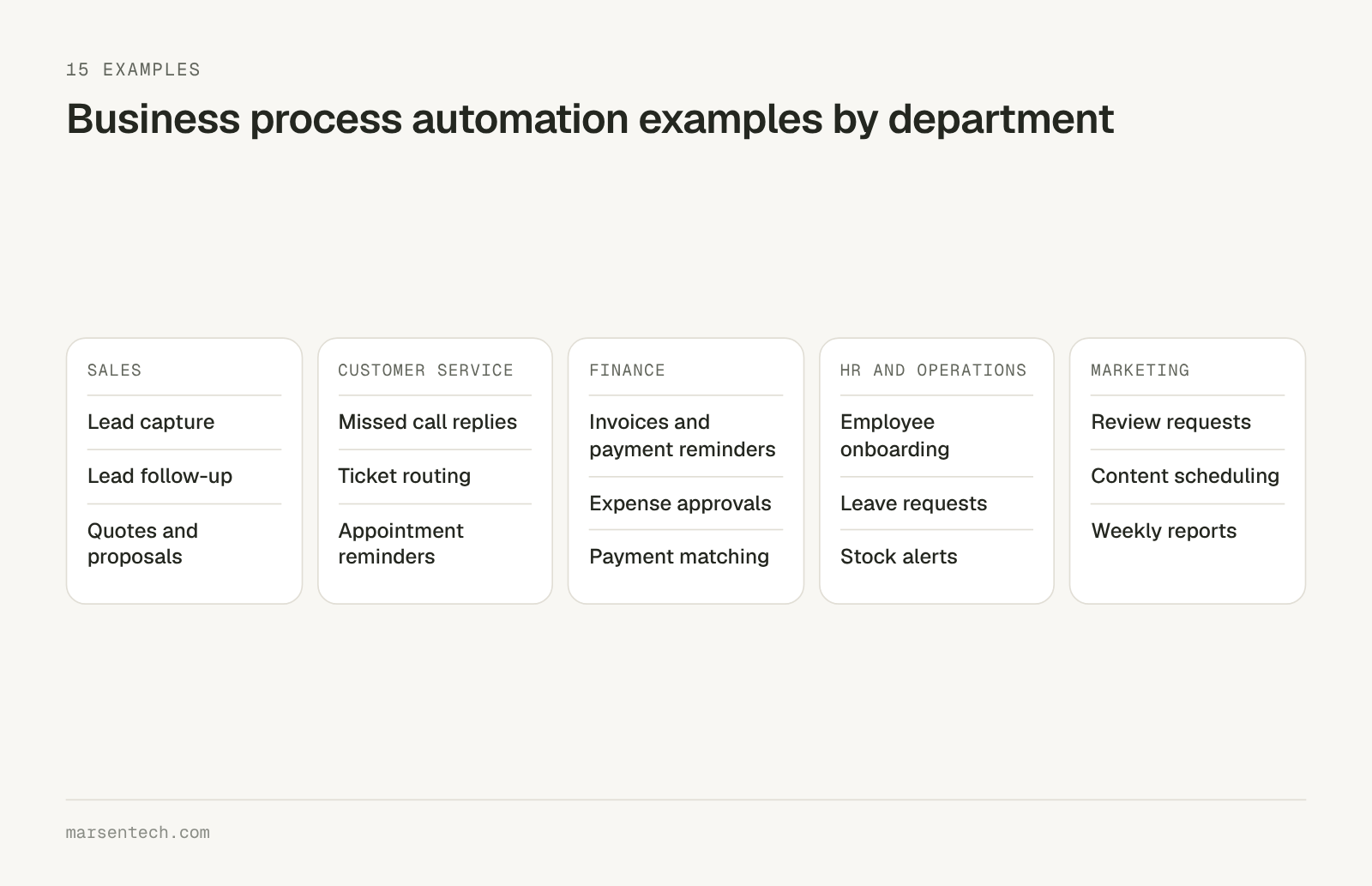
Here are 15 examples of business process automation, grouped by the team that usually owns them.
Which sales processes can you automate?
- Lead capture: A website form creates a CRM contact, assigns an owner and records where the lead came from.
- Lead follow-up: New leads get an instant reply, then two or three reminders if they don't book a call.
- Quotes and proposals: A deal that reaches a certain stage fills a quote template and sends it for approval.
Which customer service processes can you automate?
- Missed call replies: Callers you can't answer receive a text or WhatsApp message within seconds.
- Ticket routing: Incoming emails are tagged by topic and sent to the right person's queue.
- Appointment reminders: Customers get reminders a day before and a few hours before their booking.
Which finance processes can you automate?
- Invoices and payment reminders: A completed job creates an invoice, and polite reminders go out until it's paid.
- Expense approvals: Staff send a photo of a receipt, and their manager approves it with one tap.
- Payment matching: Payments that come in are matched to open invoices, and your accountant only sees the ones that don't match.
Which HR and operations processes can you automate?
- Employee onboarding: A signed offer triggers accounts, a welcome email and a first-week checklist.
- Leave requests: Staff request time off, managers approve it, and the team calendar updates itself.
- Stock alerts: When inventory drops below a set level, the system notifies the person who reorders.
Which marketing processes can you automate?
- Review requests: Happy customers receive a review link a few hours after their visit.
- Content scheduling: Approved posts publish on a set calendar across your social channels.
- Weekly reports: Leads, bookings and revenue are collected from each tool into one summary every Monday.
How does a business process automation example work step by step?
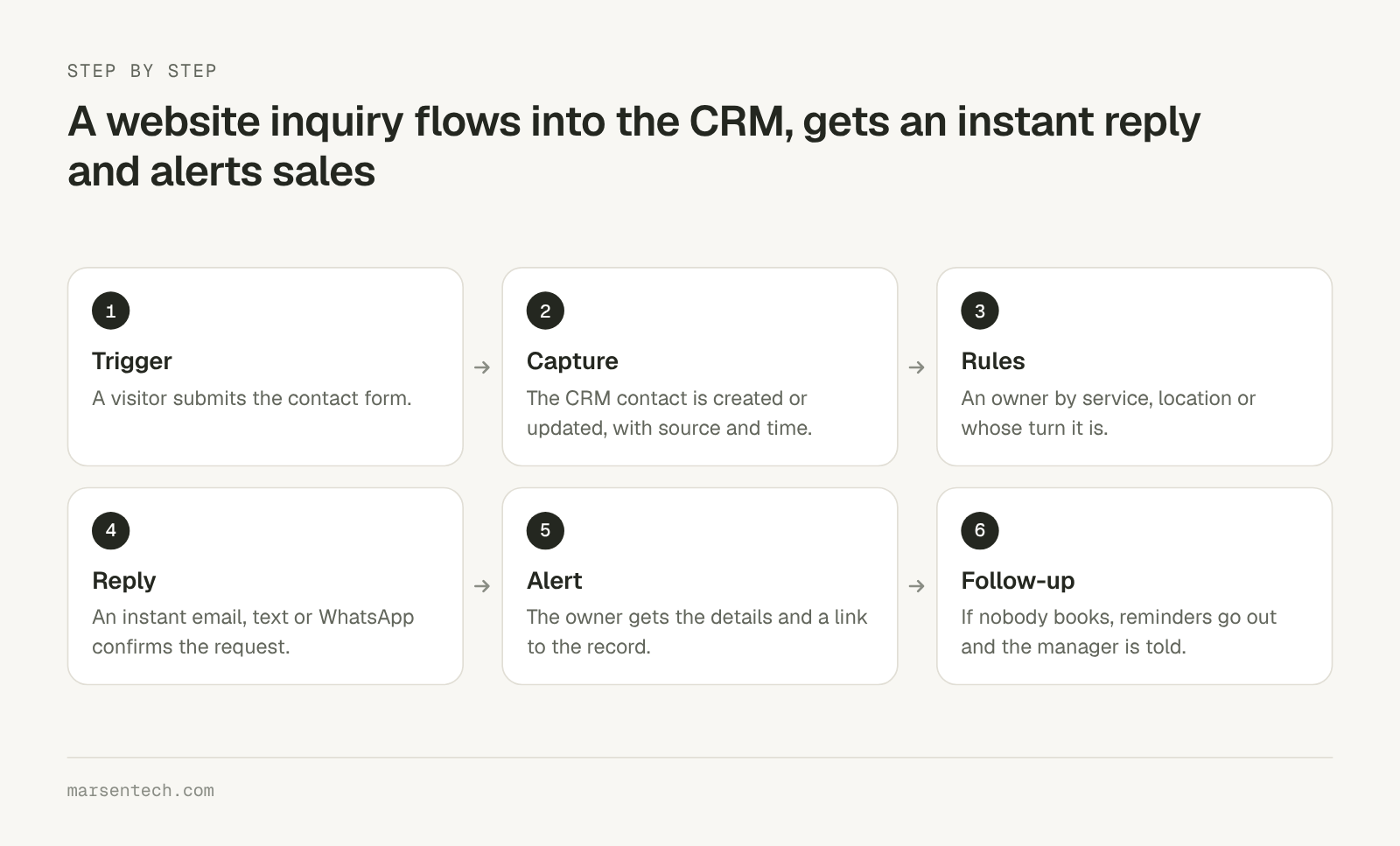
A good business process automation example is a web form that adds the lead to your CRM and replies right away.
Here's how that one workflow runs:
- Trigger: A visitor submits the contact form on your website.
- Capture: The workflow creates or updates the contact in your CRM, with the source and time.
- Rules: It assigns an owner based on service, location or whose turn it is.
- Reply: The lead receives an instant email, text or WhatsApp message that confirms the request.
- Alert: The owner gets a notification with the lead's details and a link to the record.
- Follow-up: If nobody books within a set time, reminders go out and the manager is told.
This is the inquiry-to-CRM automation we build most often. It removes copying and pasting, and no lead waits until someone checks the inbox.
What are examples of business process automation by industry?
Examples of business process automation change by industry, but most of them send replies, reminders and bookings for you.
Here's how five common industries use them:
- Clinics: Patients book online, get reminders and receive a review request after their visit.
- Coaching institutes: New inquiries get the fee details instantly, and a counselor follows up the same day.
- Real estate: Portal leads get a viewing time by text, and the agent gets an alert on their phone.
- Home services: Job requests create a booking, and the customer gets an arrival window by text.
- Professional services: New clients sign their agreement online, and onboarding tasks appear for the team.
- Retail shops: Online orders update your stock levels, and customers get a text when their order ships.
How do you choose which process to automate first?
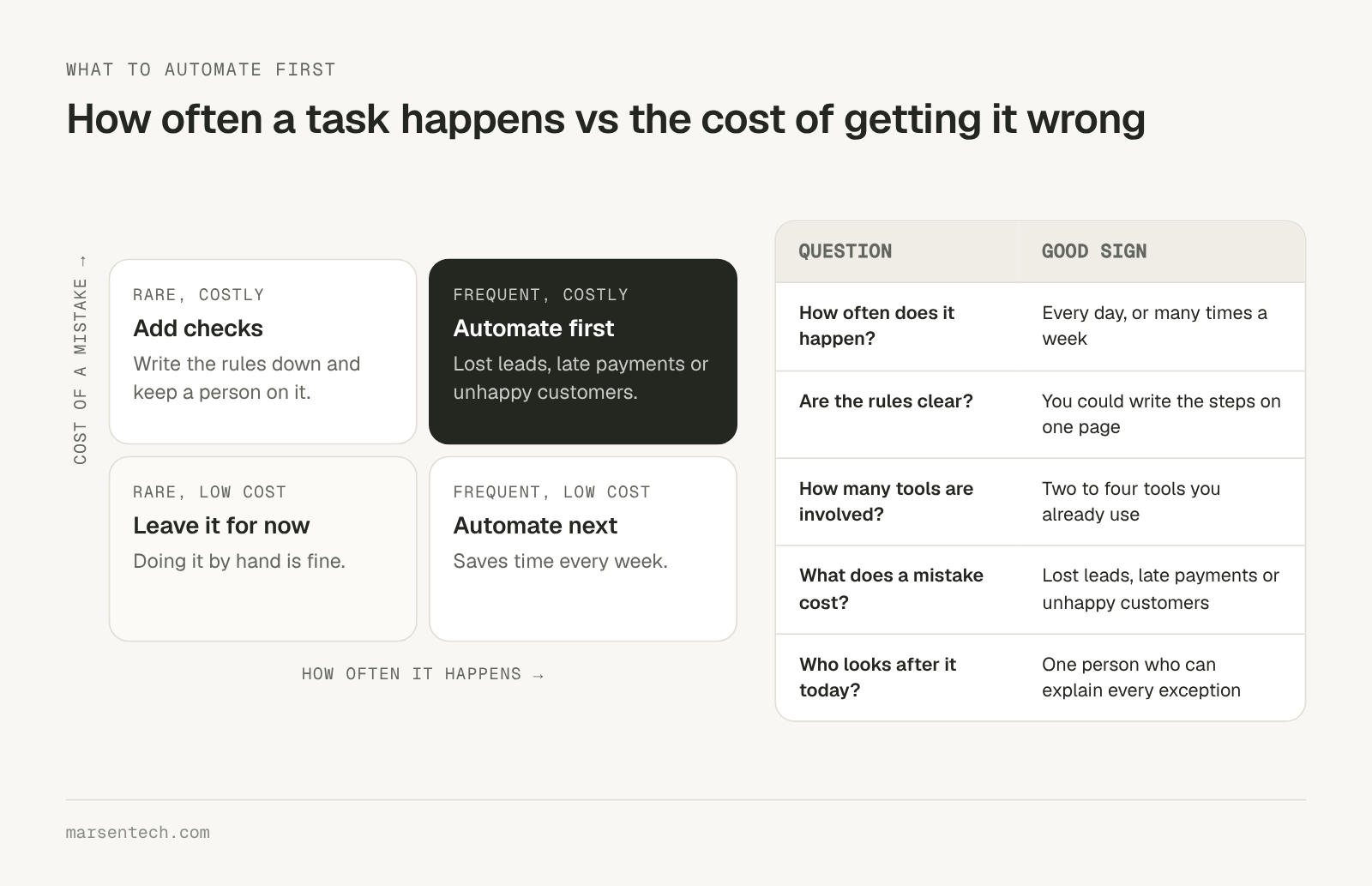
Choose the process that happens most often, follows clear rules and costs you money when it's slow or done wrong.
Score each candidate process against these questions:
| Question | Good sign for automation |
|---|---|
| How often does it happen? | Every day, or many times a week |
| Are the rules clear? | You could write the steps on one page |
| How many tools are involved? | Two to four tools you already use |
| What does a mistake cost? | Lost leads, late payments or unhappy customers |
| Who looks after this process today? | One person who can explain every exception |
The process with the most good signs usually makes the best first example of business process automation.
Which tools are used for business process automation?
Most businesses link their apps with a workflow tool and also use the automation built into their CRM.
The main types are:
- Workflow platforms: Tools like n8n, Zapier, Make and Power Automate connect apps and run steps when something happens.
- CRM automation: Most CRMs can assign leads, send emails and create tasks without another tool.
- Robotic process automation: RPA clicks through older software that has no way to connect directly.
- AI agents: These handle steps that need reading or writing, such as sorting emails or drafting replies.
We usually build with n8n, because it can run on your own server and handles complex logic. The right tool depends on your apps, your budget and who will maintain it.
Where does AI fit into business process automation?
AI fits the steps that need reading, sorting or writing, while simple rules still handle the predictable parts of a process.
For example, AI can read a new email, tell whether it's a lead or a complaint and write a reply. A rule then routes it to the right person. For risky steps like refunds, add a human approval step so a person checks the AI first.
One service business we worked with went from 1 closed deal a month to 7 after adding AI follow-up. That's one result, not a promise.
What mistakes should you avoid when automating?
The most common mistake is automating a messy process before fixing it, which makes the mess happen faster.
Watch out for these too:
- No clear owner: Someone must check the workflow and fix it when an app changes.
- No error alerts: Failed runs should notify a person, rather than failing silently.
- Too much at once: Automate one process, measure it, then move to the next one.
- No human check: Keep a person in the loop for payments, refunds and sensitive messages.
- No measurement: Record the hours, errors and response times before you start, so you can compare.
- No testing: Run the workflow with test data before real customers see it.
You can estimate the time and money a workflow saves with our free ROI calculator.
Frequently asked questions
What's the difference between BPA and RPA?
Business process automation connects apps and runs whole workflows. Robotic process automation copies a person's clicks on screen, so it's mainly used for older software without connections.
Is business process automation only for large companies?
No, small businesses often benefit sooner, because each person handles many tasks. Automating lead follow-up or invoicing can free up hours every week.
How long does it take to automate a process?
A simple workflow with two or three apps can take a few days. Bigger processes with lots of exceptions or old systems can take a few weeks to finish.
Do I need to know how to code?
Not for most workflows, because modern platforms use visual builders. Complex logic, custom connections and self-hosted setups are easier with a developer's help.
Will automation replace my employees?
Usually it removes repetitive work, not whole jobs. Staff spend less time copying data and more time with customers.
How do you measure business process automation results?
Compare the hours, errors and response times from before and after launch. Check the numbers after one month, then again after three months.
Can you automate a process without buying new software?
Yes, many tools you already pay for have simple automation built in. Your CRM, email and calendar can often send reminders and create tasks. Start there before you buy anything new.
What should you automate after the first process?
Pick the next process on your scoring list once the first one has run well for a month. Many teams move from lead follow-up to invoices, then to weekly reports.
What's the easiest process to automate first?
Lead follow-up is usually the easiest place to start, because the steps are simple and you see results fast.
Who wrote this guide?
Aranyak Sengupta is a co-founder of Marsen Technologies, an AI automation company in Siliguri, India. He builds n8n workflows, WhatsApp enquiry automation and CRM follow-up systems. His focus is coaching institutes, clinics and other service businesses.
What should you read next?

Built around your business
Put these ideas to work in your business.
Book a demoShow us how your team works today. We’ll help you choose a useful first step.