
A practical guide for your team
WhatsApp Auto Reply: How to Set Up Automatic Replies
What is a WhatsApp auto reply?
A WhatsApp auto reply is a message that WhatsApp sends for you when a customer writes in. The free WhatsApp Business app has three kinds: away messages, greeting messages and quick replies.
This guide shows you how to set up each one, step by step, with sample messages you can copy. We're Marsen Technologies, an AI automation agency in Siliguri, India. We set up WhatsApp replies for coaching institutes, clinics and other service businesses.
Can you set an auto reply on regular WhatsApp?
No, the regular WhatsApp app doesn't include away messages or greeting messages. These features come with the free WhatsApp Business app, which you can download from the Play Store or the App Store.
You can move your number from regular WhatsApp to WhatsApp Business without losing your chats. Some third-party apps promise auto replies on regular WhatsApp. They aren't official, so we don't recommend them for a business number.
How to set auto reply in WhatsApp Business?
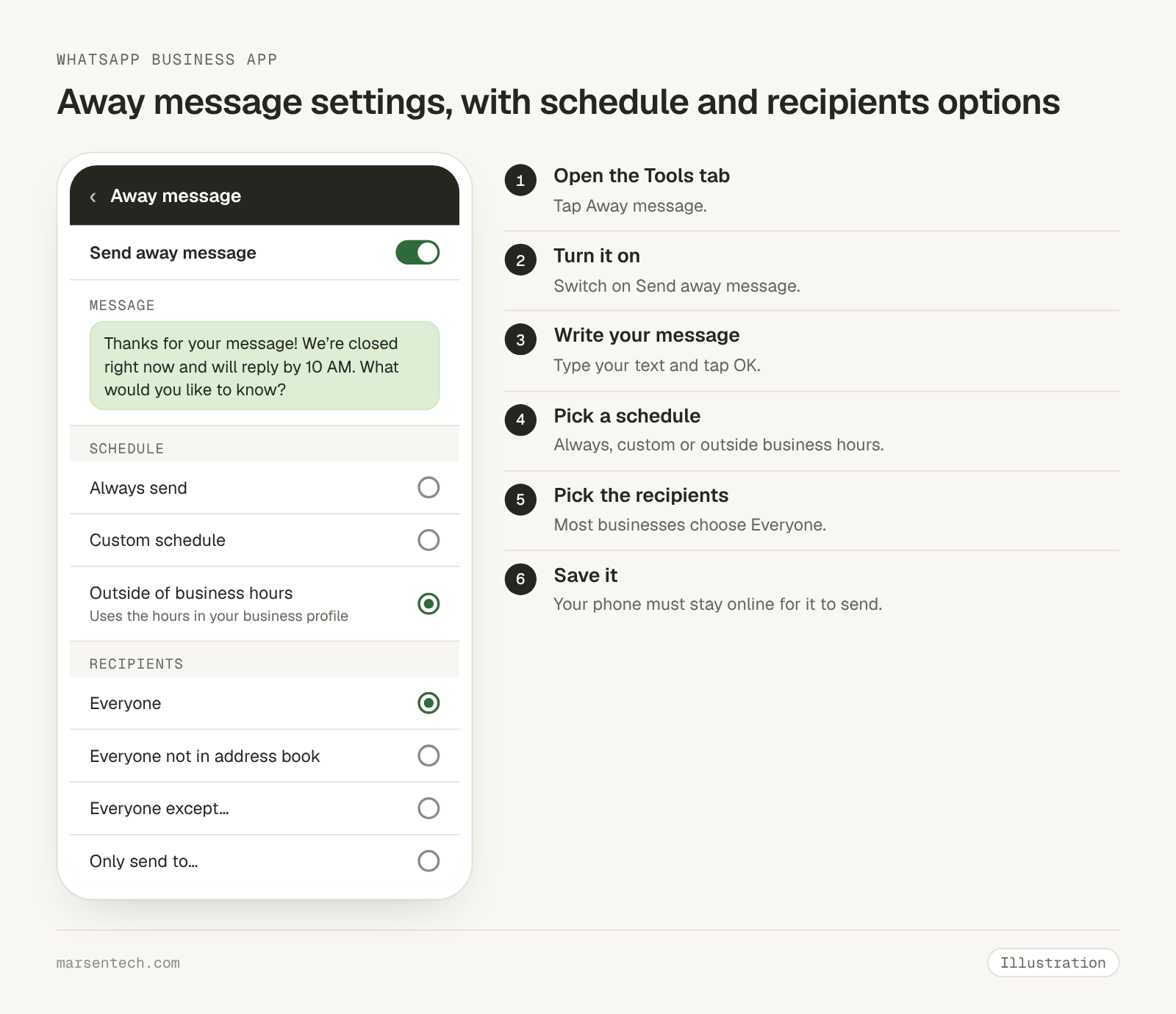
You set an auto reply in WhatsApp Business with the away message feature. Here are the steps from the WhatsApp Help Center:
- Open the Tools tab: In the WhatsApp Business app, go to Tools and tap Away message.
- Turn it on: Switch on Send away message.
- Write your message: Tap the message, type your text and tap OK.
- Pick a schedule: Tap Schedule and choose when the message goes out.
- Pick the recipients: Tap Recipients and choose who gets it.
- Save it: Tap Save, and the auto reply starts working.
Your phone needs an internet connection for away messages to go out. If your phone is off or offline, customers won't get the reply.
Which schedule should you choose?
Choose "Outside of business hours" if you want replies only when you're closed. Here are the three options:
- Always send: The away message goes out at all times.
- Custom schedule: It goes out only between the dates and times you set, which suits holidays.
- Outside of business hours: It goes out only when you're closed. This option needs your business hours in your business profile.
Who should receive your away message?
Most businesses should send it to everyone, so no new customer waits without a reply. WhatsApp gives you four choices:
- Everyone: Anyone who messages you gets the reply.
- Everyone not in address book: Only people you haven't saved get it.
- Everyone except: Everyone except the contacts you pick gets it.
- Only send to: Only the contacts you pick get it.
How do you set a greeting message?
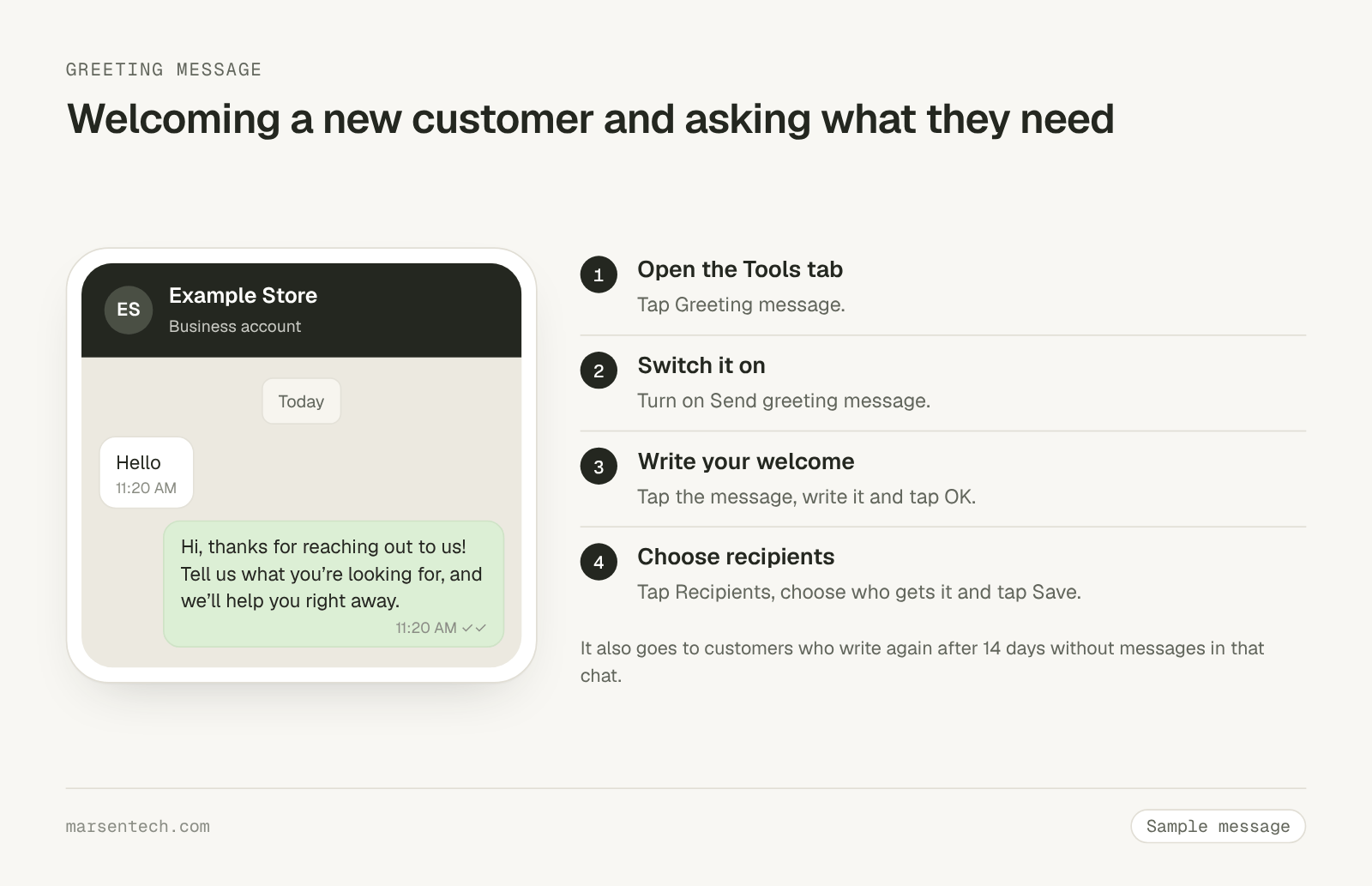
A greeting message welcomes people the first time they write to you. If you're wondering how to set automatic reply in WhatsApp for new customers, this is the feature to use.
- Open the Tools tab and tap Greeting message.
- Switch on Send greeting message.
- Tap the message, write your welcome and tap OK.
- Tap Recipients, choose who gets it and tap Save.
WhatsApp also sends the greeting to customers who write again after 14 days without any messages in that chat. You can read the full rules on the greeting messages help page.
How do quick replies work on WhatsApp?
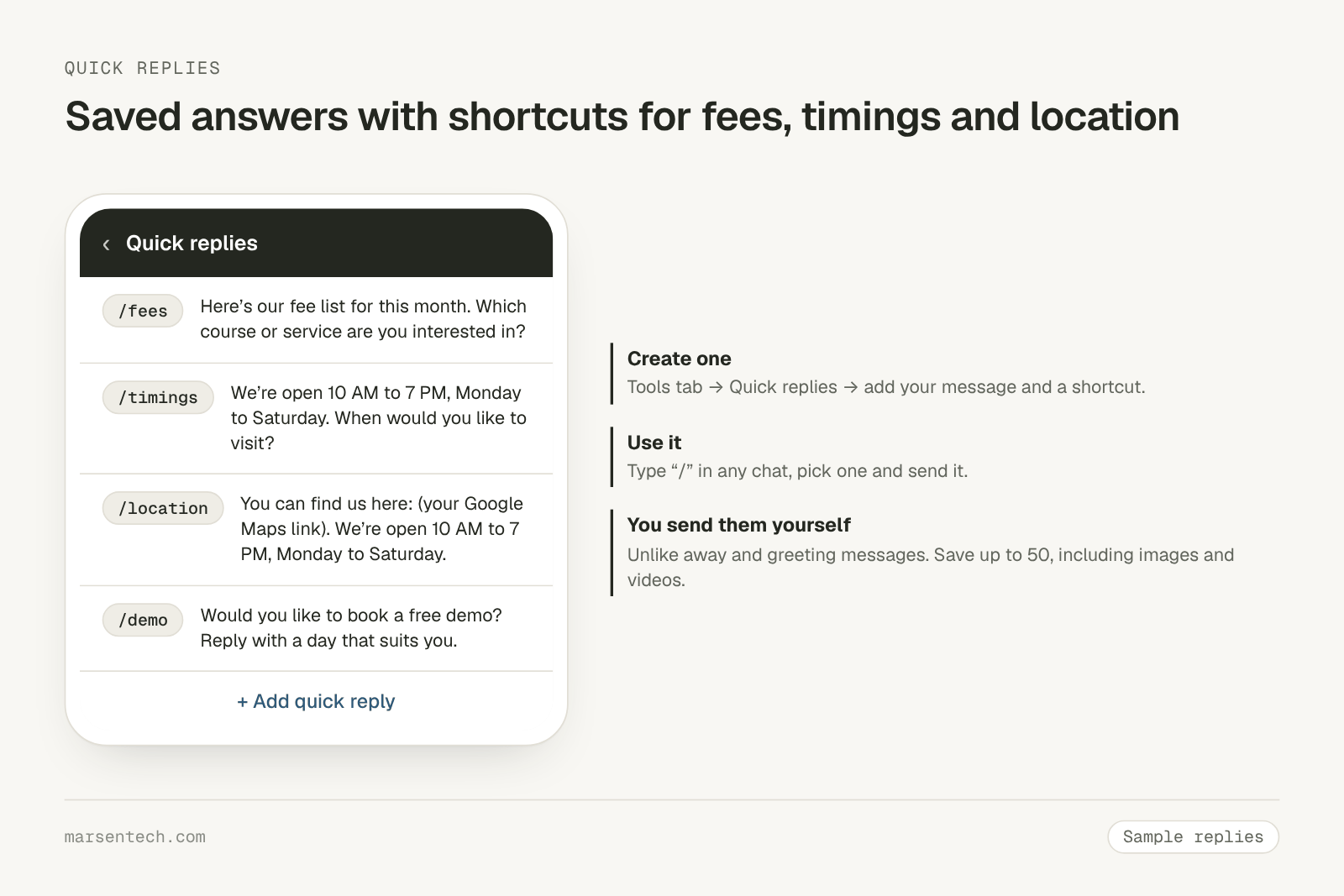
Quick reply messages are saved answers you send with a short keyword, so you don't type the same text again. Unlike away and greeting messages, you send them yourself.
To create one, open the Tools tab, tap Quick replies, add your message and give it a shortcut. In any chat, type "/" to see your list, pick one and send it. WhatsApp lets you save up to 50 quick replies, including images and videos.
What are good WhatsApp auto reply message samples?
A good auto reply thanks the person, says when you'll reply and asks one useful question. Here's a quick reply message sample for each common case:
| Situation | Sample message |
|---|---|
| Away after hours | Thanks for your message! We're closed right now and will reply by 10 AM. What would you like to know? |
| Greeting for new customers | Hi, thanks for reaching out to us! Tell us what you're looking for, and we'll help you right away. |
| Holiday | We're closed for the festival until Monday. Leave your question here, and we'll reply first thing. |
| Fees question (quick reply) | Here's our fee list for this month. Which course or service are you interested in? |
| Location (quick reply) | You can find us here: (your Google Maps link). We're open 10 AM to 7 PM, Monday to Saturday. |
Keep each message short and friendly. Promise a reply time only if your team can keep it.
What is the difference between WhatsApp Business and the WhatsApp API for auto replies?
The WhatsApp Business app suits a few chats a day. The WhatsApp Business Platform, often called the API, suits teams with many enquiries. Here's how they compare:
| Feature | WhatsApp Business app | WhatsApp Business Platform (API) |
|---|---|---|
| Auto replies | One away message and one greeting message | Different replies for each question |
| Understanding questions | Can't read what the customer asked | A chatbot can answer typed questions |
| Team use | One phone and a few linked devices | Many staff in a shared inbox |
| CRM | No connection | Saves every lead to your CRM |
| Cost | Free | Setup cost, plus Meta's charges for template messages |
On the platform, your replies within 24 hours of a customer's last message don't cost anything. Meta charges for most template messages you send after that window.
Can WhatsApp reply with AI on its own?
Yes, Meta offers an AI feature called Meta Business Agent in the WhatsApp Business app. It reads your business profile, catalogue and website, then answers simple questions for you.
It's only available to select businesses in some countries for now. Turning it on can switch off your greeting and away messages, and Meta uses those chats to improve its AI. Read the terms carefully before you switch it on.
What mistakes should you avoid with WhatsApp automatic replies?
A WhatsApp automatic reply works best when it sounds human and promises only what you can deliver. Watch out for these common mistakes:
- No useful information: "We'll get back to you" alone doesn't help, so add your hours or a question.
- Wrong recipients: "Only send to" can leave new customers without any reply.
- Old messages: Update your away message after holidays and timing changes.
- Promises you can't keep: Only promise a reply time, like 10 minutes, if someone checks the phone that often.
- Too many quick replies: Keep the list short and clear, so your team finds the right one fast.
When should your business move to a WhatsApp chatbot?
Move to a chatbot when one away message can't answer what people really ask. The app sends the same text to everyone, so a fee question and a complaint get the same reply.
A WhatsApp chatbot on the official platform reads each question, shares the right answer and books the next step. It can also text people who call when you're busy, with a missed-call auto-reply. One service business we worked with went from 1 closed deal a month to 7 after adding AI follow-up. That's one result, not a promise.
Not sure if you've outgrown the app? Book a free 60-second enquiry audit and we'll show you where your WhatsApp replies lose leads.
Frequently asked questions
Is WhatsApp auto reply free?
Yes, away messages, greeting messages and quick replies are free in the WhatsApp Business app. You only pay for the API route, where Meta charges for most template messages.
Why is my WhatsApp away message not sending?
Check that your phone has internet and that your recipients setting includes the person. Also check your schedule, because "Outside of business hours" needs your hours set in your profile.
Can I send different auto replies to different customers?
Not in the app, because it sends one away message and one greeting message. A chatbot on the WhatsApp Business Platform can give each customer a different reply.
How many quick replies can I save?
You can save up to 50 quick replies in the WhatsApp Business app. Each one can include text, images or videos.
Can I use auto reply on WhatsApp Web?
You set up away and greeting messages in the phone app. WhatsApp's help page says your device needs an internet connection for them to go out, so keep your phone online.
Do auto replies work in Hindi or other languages?
Yes, you can write your away message, greeting and quick replies in Hindi, Bengali or any language. WhatsApp sends the exact text you type.
Who wrote this guide?
Aranyak Sengupta is a co-founder of Marsen Technologies, an AI automation company in Siliguri, India. He builds WhatsApp replies, chatbots and follow-up automation. His focus is coaching institutes, clinics and other service businesses.
What should you read next?

Built around your business
Put these ideas to work in your business.
Book a demoShow us how your team works today. We’ll help you choose a useful first step.