
Practical guides from Marsen
Reminder WhatsApp Message: 25 Free Templates
What is a reminder WhatsApp message?
A reminder WhatsApp message is a short message that tells a customer about something coming up. It could be an appointment, a payment or a class.
A good reminder saves your customer from forgetting and saves you from an empty slot or a late payment. It states what is due, when it is due and what the customer should do next.
Below, you'll find 25 free WhatsApp reminder message templates for appointments, payments, meetings, events, classes and renewals. Replace the words in square brackets with your own details.
We're Marsen Technologies, an AI automation agency in Siliguri, India. We build WhatsApp reminders and follow-up for clinics, coaching institutes and service businesses.
What should a reminder message include?
A WhatsApp reminder message needs five things: your business name, what is due, the date and time, the place or link, and one action.
Here's what to write for each part:
- Your business name: Customers receive many messages, so say who you are in the first line.
- What is due: Name the appointment, payment, class or document, so there's no confusion.
- The date and time: Write the full date and time, like "Saturday, 28 November at 4 PM".
- The place or link: Add the address, a Google Maps link, a payment link or a meeting link.
- One action: Ask the customer to confirm, reschedule or pay, but choose only one.
What is a good appointment reminder WhatsApp message?
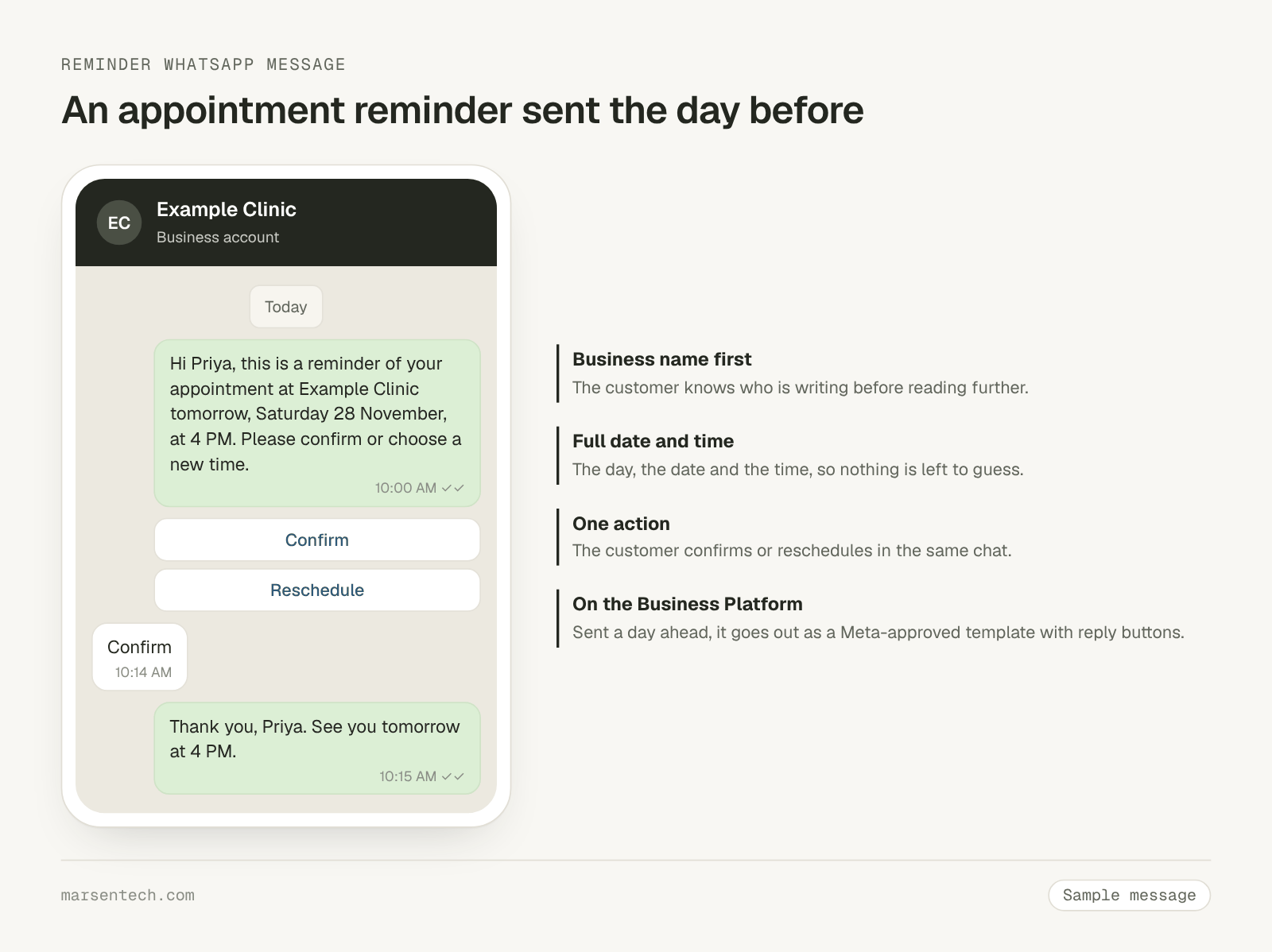
A good appointment reminder WhatsApp message gives the date, time and place, and asks the customer to confirm.
Use these four for appointments and bookings:
| When to send | Message |
|---|---|
| One day before | Hi [customer name], this is a reminder of your appointment at [business name] tomorrow, [date], at [time]. Please reply YES to confirm or RESCHEDULE to change the time. |
| Two hours before | Hi [customer name], your appointment at [business name] is today at [time]. Here's our location: [Google Maps link]. See you soon. |
| When they haven't confirmed | Hi [customer name], we haven't received your confirmation for tomorrow's appointment at [time]. Is the time still convenient for you? |
| After a missed appointment | Hi [customer name], we missed you at your appointment today. Would you like to book another time this week? |
What is a polite payment reminder message?
A polite payment reminder message gives the amount, the due date and an easy way to pay. It should stay kind and never blame the customer.
Send these four at different points:
| When to send | Message |
|---|---|
| Three days before | Hi [customer name], a quick reminder that your payment of [amount] for [service] is due on [date]. You can pay here: [payment link]. |
| On the due date | Hi [customer name], your payment of [amount] for [invoice number] is due today. If you've already paid, thank you, and please ignore this reminder. |
| Three days after | Hi [customer name], our records show that [amount] for [invoice number] is still pending. Is there anything stopping the payment that we can help with? |
| The final reminder | Hi [customer name], this is a final reminder about [amount] for [invoice number], which was due on [date]. Please pay by [new date] or call us at [phone number] to discuss it. |
How do you gently remind someone on WhatsApp?
To gently remind someone on WhatsApp, keep it short, assume they're busy and make it easy to reply.
Here's how to gently remind someone without sounding rude, with three gentle reminder message examples:
| When to send | Message |
|---|---|
| Waiting for a reply | Hi [customer name], just a gentle reminder about my message on [day]. Whenever you have a moment, please let me know what you think. |
| Waiting for documents | Hi [customer name], a gentle reminder to share [document] when you can. We need it before [date] to complete [service]. |
| Waiting for a form | Hi [customer name], a gentle reminder to fill in the [form name] here: [link]. It takes about two minutes. |
Which reminder messages work for meetings and events?
Good meeting and event reminders repeat the date, time and place. You should also add the link or directions people need.
Use these four for meetings, events and webinars:
| When to send | Message |
|---|---|
| The day before a meeting | Hi [customer name], this is a reminder of our meeting tomorrow, [date], at [time]. The agenda is [topic]. Please let me know if the time no longer works. |
| One hour before an online meeting | Hi [customer name], our call starts in one hour at [time]. Here's the link to join: [meeting link]. |
| One week before an event | Hi [customer name], [event name] is next [day], [date], at [venue]. Please reply YES if you're still coming, so we can plan the seating. |
| The morning of an event | Hi [customer name], see you today at [event name]. Doors open at [time], and here's the location: [Google Maps link]. |
What reminders should you send for classes and bookings?
Class and booking reminders should name the batch or service, the time and anything the customer needs to bring.
These three work for classes, courses and service bookings:
| When to send | Message |
|---|---|
| The day before a class | Hi [student name], your [subject] class is tomorrow at [time] at [location or link]. Please bring [book or material]. |
| Before a test or exam | Hi [parent name], a reminder that [student name] has a [subject] test on [date]. Please make sure [student name] revises [chapter]. |
| Before a service visit | Hi [customer name], our technician will visit on [date] between [time] and [time] for [service]. Please reply if you need to change the slot. |
What should a renewal or due-date reminder say?
A renewal or due-date reminder should say what's expiring, when it ends and how to renew. Keep it friendly, so it doesn't feel pushy.
Send these four ahead of renewals and due dates:
| When to send | Message |
|---|---|
| Two weeks before a renewal | Hi [customer name], your [plan or membership] with [business name] ends on [date]. Reply RENEW and we'll send you the details. |
| When a service is due | Hi [customer name], your [vehicle service, check-up or maintenance] is due on [date]. Would you like us to book a slot for you? |
| Before a document expires | Hi [customer name], your [document] expires on [date]. Please share the renewed copy before then, so there's no delay with [service]. |
| After the plan ends | Hi [customer name], your [plan or membership] ended on [date]. If you'd like to continue, reply here and we'll help you renew. |
What should the last reminder message say?
The last reminder message should state the final date clearly and tell the customer what happens next.
Use one of these three, then stop sending reminders:
| When to send | Message |
|---|---|
| The last appointment reminder | Hi [customer name], we're holding your slot until [time] today. If we don't hear from you by then, the slot will go to another customer. |
| The last form reminder | Hi [customer name], the last date to submit [form name] is [date]. After that, we won't be able to process [service]. |
| The last event reminder | Hi [customer name], registrations for [event name] close tonight. Reply YES if you'd like us to keep your place. |
When should you send each reminder message?
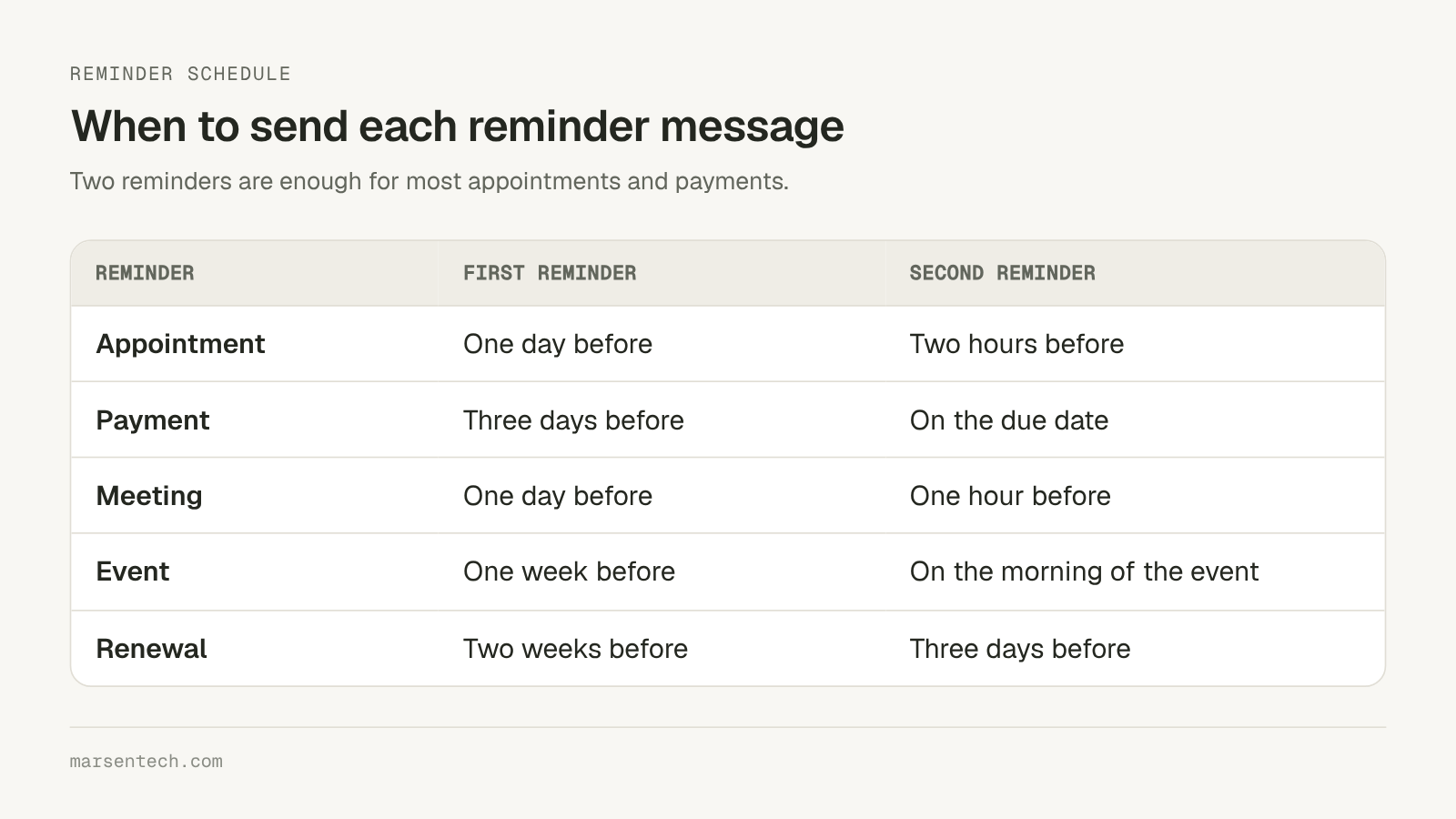
Send most reminders one day before the due date, and add a second one on the day for important appointments.
Here's a simple schedule you can adapt for your business:
| Reminder | First reminder | Second reminder |
|---|---|---|
| Appointment | One day before | Two hours before |
| Payment | Three days before | On the due date |
| Meeting | One day before | One hour before |
| Event | One week before | On the morning of the event |
| Renewal | Two weeks before | Three days before |
How do you send reminder messages on WhatsApp automatically?
You'll need the WhatsApp Business Platform to send reminder messages automatically. You also need a system that sends the right template at the right time.
In the free WhatsApp Business app, you type and send each reminder yourself. Save the reminders you use most often as quick replies, then type "/" in a chat to choose one.
On the Business Platform, your booking or billing system can send reminders automatically. Each reminder goes out as a message template that Meta has approved. Under the WhatsApp Business Messaging Policy, you can only message people who gave you their number. They must also have agreed to hear from you.
Are reminder messages marketing or utility on WhatsApp?
Most reminder messages are utility messages. They must be about the customer's own booking, account or payment, and they can't sell anything.
Meta's guide to template categories says a utility template can't promote anything. It must also relate to the customer's order, account, service or transaction. Here's how that applies to reminders:
| Reminder | Likely category | Why |
|---|---|---|
| Appointment reminder | Utility | It's about the customer's own booking |
| Payment due reminder | Utility | It's about the customer's own account |
| Renewal reminder with a discount | Marketing | It includes an offer to renew |
| Reminder about a new sale | Marketing | It promotes your products |
If you choose utility and WhatsApp decides the template is marketing, Meta approves it as a marketing template. Meta charges for most template messages, so check the category before you send.
What mistakes should you avoid in reminder messages?
The biggest mistake is a reminder without the date, the time or a way to reschedule.
Watch out for these too:
- Sending it too early: A reminder sent a week before an appointment is easy to forget again.
- No way to reply: Customers should be able to confirm or change the time in the same chat.
- A harsh tone: Payment reminders that sound like threats damage the relationship.
- Too many reminders: You'll rarely need more than two reminders for each appointment.
- Hidden offers: An offer inside an appointment reminder can turn a utility template into a marketing one.
When should you automate your reminder messages?
Automate your reminder messages when your team sends the same reminders by hand every day. It also helps when no-shows and late payments keep happening.
Our AI receptionist for clinics sends WhatsApp reminders 24 hours and 2 hours before each appointment. If you run a coaching institute, our admission management system can handle your demo and fee reminders.
One service business we worked with went from 1 closed deal a month to 7 after adding AI follow-up. That's one result, not a promise. Book a free 60-second enquiry audit and we'll show you which reminders your business can automate first.
What else do business owners ask about reminder messages?
Here are short answers to the other questions you might have.
How many reminders should you send?
Two reminders are enough for most appointments and payments. Send a final reminder only when a deadline matters, then stop.
How early should you send a reminder?
One day before works for most appointments and meetings. For payments and renewals, start a few days to two weeks before the due date.
Can customers reply to a reminder message?
Yes. When a customer replies on the WhatsApp Business Platform, a 24-hour window opens. During that window, your team can reply freely without a template.
Are these templates free to use?
Yes. You can copy them, change them and send them from the WhatsApp Business app at no cost.
Can you send reminders in Hindi or Bengali?
Yes. WhatsApp sends the text exactly as you type it, in any language. You can also send the same reminder in English and in your customer's language.
Do you need Meta's approval for reminder templates?
You only need it on the WhatsApp Business Platform, where Meta checks each template before you can use it. In the free app, you can send any reminder you type.
Who wrote this page?
Aranyak Sengupta is a co-founder of Marsen Technologies, an AI automation company in Siliguri, India. He builds WhatsApp reminders, follow-up and CRM workflows for clinics, coaching institutes and service businesses. This page was last reviewed on 22 Nov 2026.
What should you read next?
Read these pages next to write better messages and automate your reminders.

Built around your business
Put what you’ve learned to work.
Book a demoBring us your questions. We’ll help you find a useful next step for your business.