The Marsen toolbox / SEO
Free SEO Audit Tool for Any Web Page
A single noindex tag left over from a redesign can hide a page from Google. The page looks normal, and nothing appears broken.
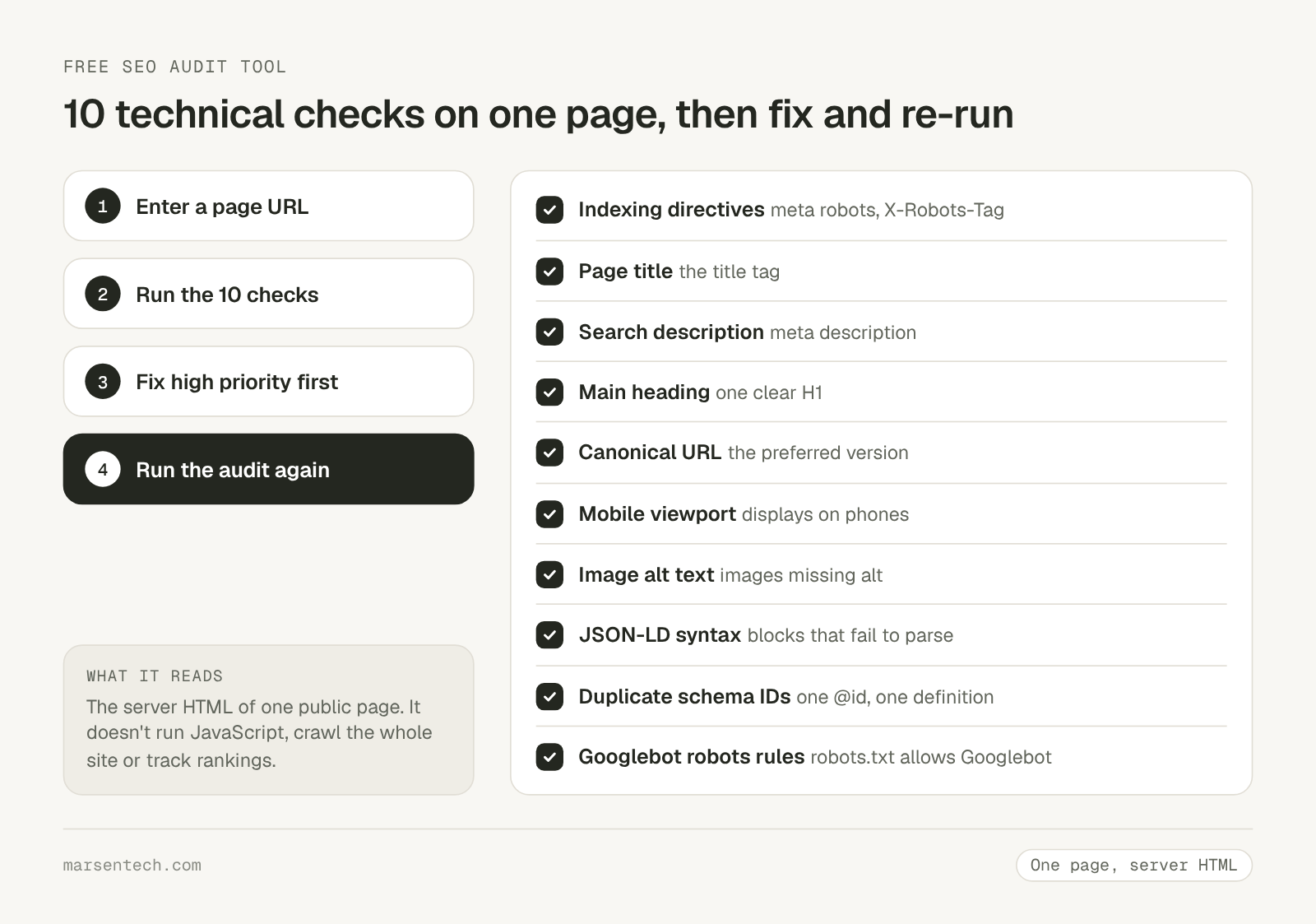
This free online SEO audit checks one public page for 10 technical basics. It reviews your robots rules, title, description, canonical URL, headings, image alt text and JSON-LD. You'll see what passed, what needs a review and the exact values it found.
You can run an SEO audit free of charge, with no registration. Enter a page URL in the audit tool below, then use this page to fix what it finds.
Start with your input
Run the SEO Audit
Inspect one public page for crawl declarations, metadata, headings, canonicals, images and JSON-LD.
What does this free SEO audit check?
It checks 10 technical basics on one page and marks each one as passed or worth a review.
| Check | What it looks for | Why it matters |
|---|---|---|
| Indexing directives | Meta robots and X-Robots-Tag rules, such as noindex | A stray noindex can keep the page out of search |
| Page title | The title tag | It's often the headline people see in results |
| Search description | The meta description | It can become the snippet under your title |
| Main heading | The number of H1 headings and their text | One clear H1 tells readers and search engines the topic |
| Canonical URL | The preferred URL you declare | It helps search engines pick the right version |
| Mobile viewport | The viewport setting | Pages need it to display properly on phones |
| Image alt text | Images with no alt attribute | Alt text describes images for screen readers and search |
| JSON-LD syntax | Structured data blocks that fail to parse | Broken code can't be read at all |
| Duplicate schema IDs | The same @id defined more than once | Repeated definitions can send mixed signals |
| Googlebot robots rules | Whether robots.txt allows Googlebot | A blocked crawler can't fetch the page |
What does the report show?
The report shows how many checks passed, how many need a review and how many couldn't run. Each review item comes with a priority and a short next step. It also lists what it found, such as your exact title, so you can catch errors. You can download the full report as a JSON file.
Why run a free SEO audit?
An audit catches setup mistakes that quietly stop search engines from showing your page.
These mistakes are rarely visible on the page itself. A theme update can drop your meta description, or a plugin can add a second H1. A staging setting can leave noindex in place after launch. A quick audit after each update catches these issues before they cost you traffic.
Which pages should you audit first?
Audit the pages that generate leads first, such as your home page, main service pages and contact page. Then review your most popular blog posts.
What problems does an SEO audit usually find?
You'll often see missing meta descriptions, missing or extra H1 headings, no canonical tag and images without alt text. Indexing problems matter most, because they can remove a page from search results entirely.
How do you check your website's SEO for free?
Paste in one page URL, run the audit and fix the review items, starting with the most urgent.
Follow these five steps:
- Choose the page: start with a page that generates leads, like your home page or a service page.
- Run the audit: paste the full URL, including https, and select Run SEO audit.
- Fix high priority first: start with anything marked high, then work through the medium items.
- Check the values: read the exact title, description and canonical URL it found to spot mistakes.
- Audit it again: publish your fix and rerun the same URL to confirm it passes.
What did the audit find on our own website?
Our home page and blog index both passed all 10 technical checks.
On 23 November 2026, we audited marsentech.com and our blog index page. Both passed the indexing, title, heading, canonical URL and JSON-LD checks.
A clean result only means the basics are in place. It doesn't measure rankings, content quality or backlinks.
What does a failing result look like?
On the same day, we audited example.com, a placeholder domain. It passed 7 checks and flagged 3 for review. It had no meta description, no H1 and no canonical URL.
How do you fix common SEO audit issues?
Fix anything that blocks indexing first, then work on titles, descriptions and headings.
| Review item | How to fix it |
|---|---|
| Noindex found | Remove it if the page should appear in search, or keep it if it's intentional |
| Robots.txt blocks Googlebot | Edit robots.txt so it allows the pages you want found |
| No title or a generic one | Write a unique title that names the page's topic |
| No meta description | Summarize the page in one or two plain sentences |
| No H1 or several | Use one descriptive H1 at the top of the page |
| No canonical URL | Add a canonical link to the preferred URL |
| Images without alt | Describe useful images, and use empty alt for decorative ones |
| JSON-LD errors or repeated IDs | Fix the syntax and define each @id once |
Our schema markup generator builds clean JSON-LD if that check fails.
What doesn't this SEO audit check?
It doesn't crawl your entire website, monitor rankings or measure speed.
It reads the server HTML of one page, so it doesn't run JavaScript. It doesn't evaluate backlinks, keyword targeting or content quality. For speed, use Google's PageSpeed Insights.
When do you need a full site audit?
You need one when you have many pages or suspect sitewide problems, like broken links or redirect chains. A crawler checks every page, while this tool gives you a quick check of one page.
What else do people ask about free SEO audits?
Here are short answers to the questions we hear most.
Is this SEO audit tool really free?
Yes. It's completely free, and you don't need an account. Our server retrieves the page's public HTML and robots.txt. We do not save a copy of your report.
Can I check my website SEO for free here?
Yes. Paste any public page URL, and the audit finishes in seconds. Repeat it for each important page, one at a time.
What is an SEO audit?
An SEO audit is a review of how well a page or website is optimized for search engines. It looks for problems that stop pages from being found, understood or shown.
Do I need technical skills to use it?
No. You only need a page URL. Some fixes, like editing robots.txt or JSON-LD, may need help from your developer.
Does it give me an SEO score?
No. It shows how many checks passed and which items need attention. A specific list of fixes is more useful than a single number.
Does it check my rankings?
No. It examines how the page is configured, not where it ranks. Use Google Search Console to monitor your positions and clicks.
Does it check the mobile viewport?
Yes. It checks for a viewport setting, which phones need to display the page properly. It doesn't test layout or speed on mobile.
Can it fix problems for me?
No. It reports what it finds, and you or your developer make the changes in your website editor.
How is this different from your website grader?
The website grader adds five page quality checks to these 10. Use it when you also want to check the contact path, forms and social preview.
Why might the audit fail to fetch a page?
The server may block automated requests, require a login or be down. Check that the URL is public and loads in a private browser window.
Can I audit a competitor's page?
Yes. Any public page works, so you can check theirs next to yours.
How often should I run an SEO audit?
Run it after every redesign, theme update or new plugin. A quick check every few months also catches problems that creep in.
Does it work with WordPress, Wix or Shopify?
Yes. It reads the public HTML, so it works with any website platform. Details that only appear after JavaScript runs may not pass.
Does passing every check improve my rankings?
No. Passing shows your technical basics are in place. It can't guarantee rankings, traffic or leads.
Who wrote this page?
Aranyak Sengupta is a co-founder of Marsen Technologies, an AI automation company in Siliguri, India. He builds and tests our technical SEO work, n8n workflows and AI agents. He also ran the audits on our own pages described above. This page was last reviewed on 23 Nov 2026.
What should you read next?
Read these pages next to fix what the audit finds.
Optional
Want a second pair of eyes on your result?
Send us the page you checked. Aranyak will reply by email with notes on what to fix first and, if it helps, a free 15-minute review call. No account and no newsletter.
Need to check something else?
Related free tools.
These tools can help you look at another part of the same problem.

You have a result. Now what?
Let’s turn it into a useful improvement.
Help me with the next stepBring us your result. We’ll help you decide what to fix first and make the changes.